



























Notifications screen: how to set up price change alerts
Want to get instant updates about the price changes of your coins? With Trustee Plus it’s easy — set up notifications in just one minute.
Where to find it?
Go to Profile → Notifications.
In this section, you will see a separate block called Asset Price Notifications.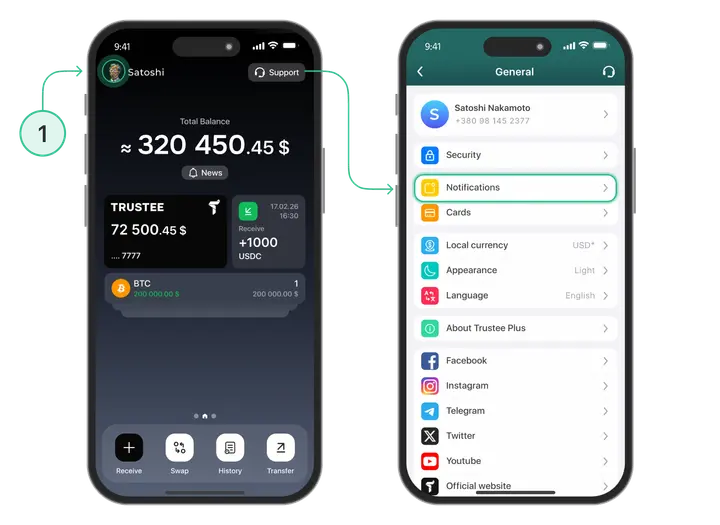
What can you configure?
On this screen you can adjust general parameters that determine when you will receive notifications:
- Period — the time interval within which the price change is analysed (for example, 4 hours).
- Price change (%) — the percentage fluctuation that triggers a notification (for example, ±20%).
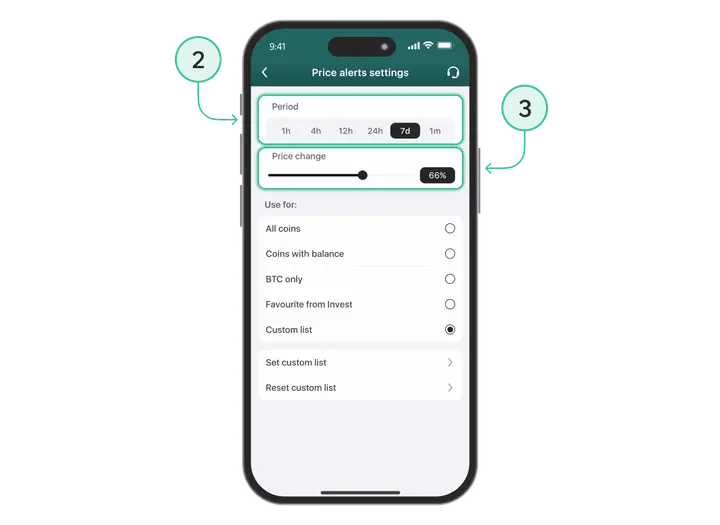
Example:
If you set “Period: 4 hours” and “Change: 20%”, and the BTC price changes by 20% within that period — you’ll receive an instant notification.
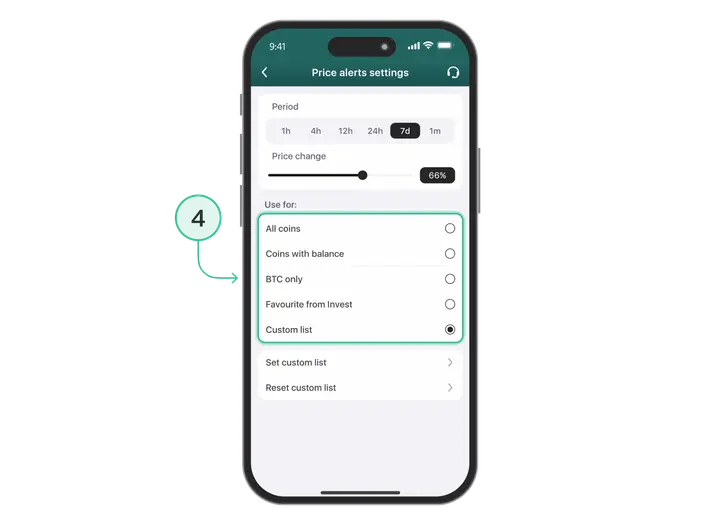
Which assets can these settings be applied to?
- You can choose one of the categories:
- All assets in the app
- Only assets with a positive balance (coins that are in your wallet)
- BTC only
- Assets from your Invest section list
- Your personal asset list
Flexible asset management
In this section, you can also:
- turn notifications on or off for specific coins
- add or remove assets from the list
- set individual price change parameters for each asset
Stay prepared with Trustee Plus
Don’t miss important market movements and manage your assets with confidence.
Useful instructions:
Install Trustee Plus - a crypto wallet with payment card!
All the benefits in one app




This website uses cookiesIn order to ensure the functionality of the Website and to prepare a statistical analysis of the website visitors' navigation methods, we use cookies. Manage preferences