



























How to create a backup copy of a wallet
1. Open Settings.
2. Select My wallets.
3. On the Wallets screen, locate the wallet, for which you want to save the Recovery phrase. Select the four dots button (Wallet Settings).
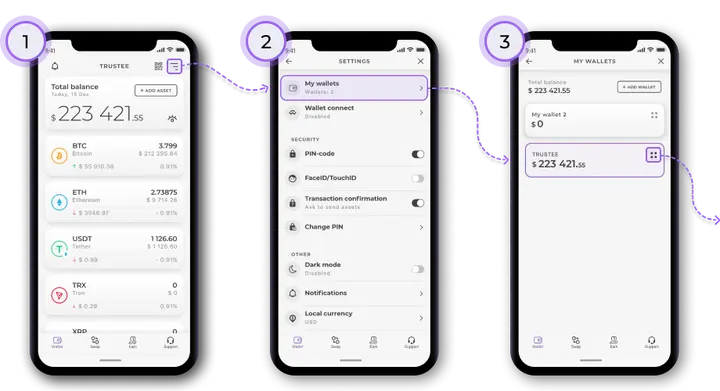
4. Select Recovery phrase (the Key icon).
5. Push and hold each word of the Recovery phrase to reveal it. Write the Recovery phrase down on a piece of paper, word for word, in the original order. Keep it somewhere safe.
Install Trustee Plus - a crypto wallet with payment card!
All the benefits in one app




This website uses cookiesIn order to ensure the functionality of the Website and to prepare a statistical analysis of the website visitors' navigation methods, we use cookies. Manage preferences