






























Trustee Plus has one of the most powerful and rewarding crypto referral programmes among cryptocurrency services. It is designed so that anyone can receive their first digital assets without any additional investment.
Sounds like someone is handing you a winning lottery ticket? In reality, this is a genuine opportunity for you!
The mechanics are extremely simple:
- Any of your friends can install Trustee Plus using your personal referral link.
- At that moment, they become your referral.
- There is a 0.5% fee for each exchange and top-up of the card. You get up to 45% of the reward from it..
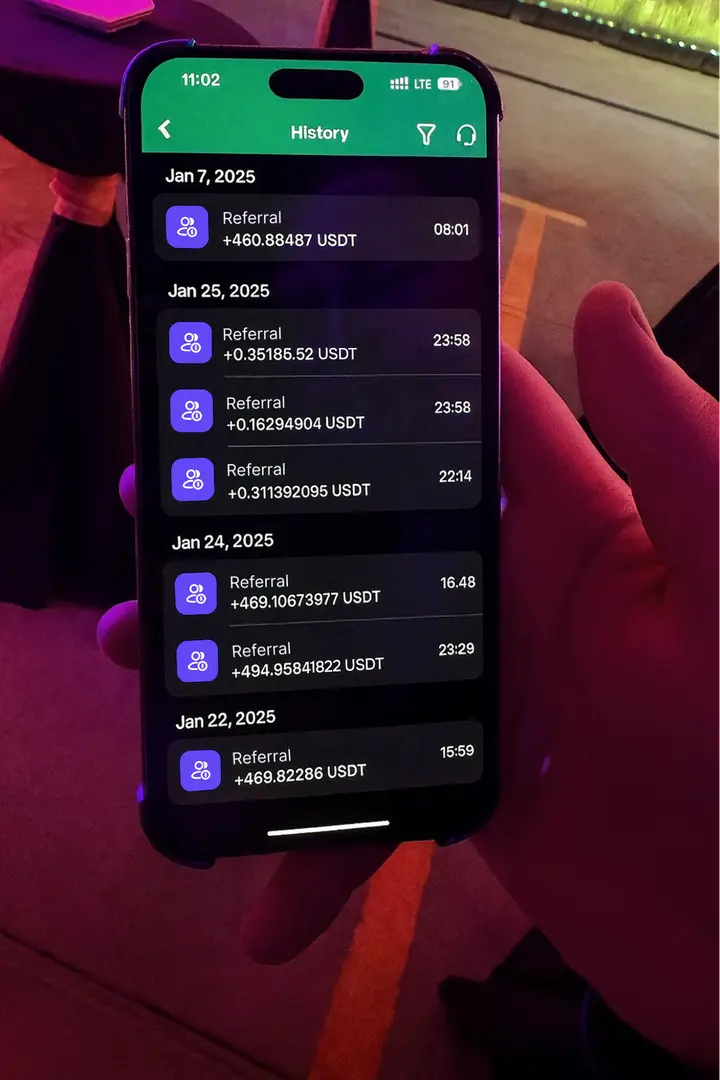
In the image: part of the earnings of one of the Trustee Plus referrers over several days. Source
There are two earning formulas — 25/20 or 20/25:
- 25% from users you invite directly + 20% from users invited by your referrals.
- Or the other way round — 20% from direct users and 25% from the second level.
The referral of your referral is also your referral, so your network can grow exponentially.
How to choose the percentages and configure separate links — we’ll go through it below.
What you need to do to start earning cryptocurrency
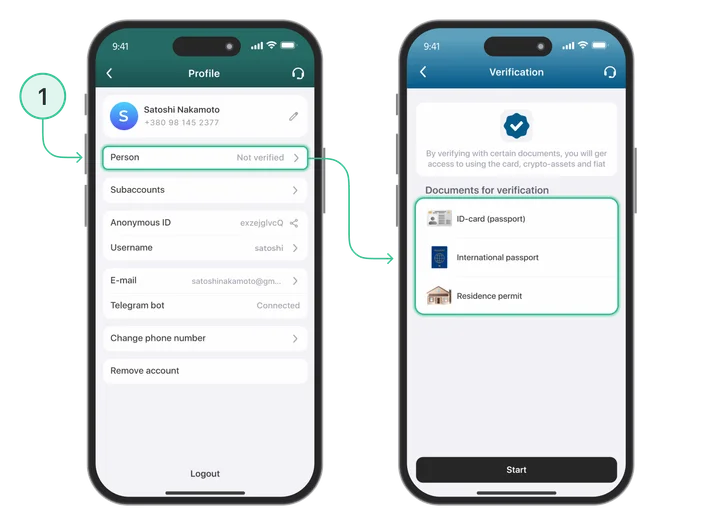
- Register in Trustee Plus and complete verification. This is important because without it, you will not be able to receive referral rewards.
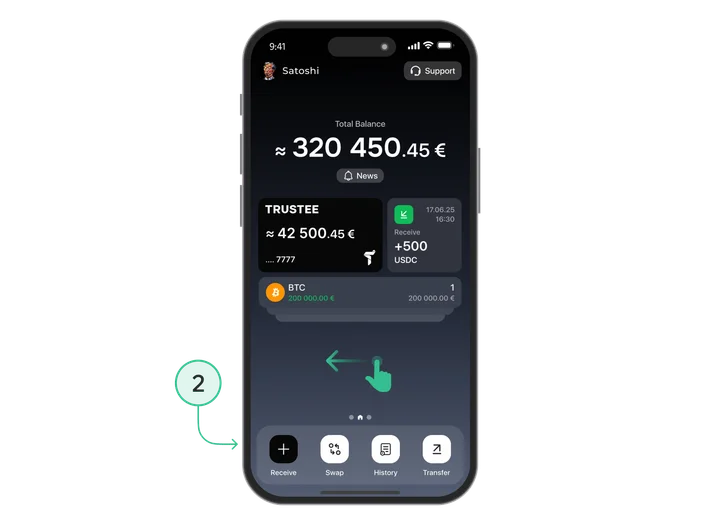
- On the main screen, swipe left.
- Go to the “Referral programme” section.
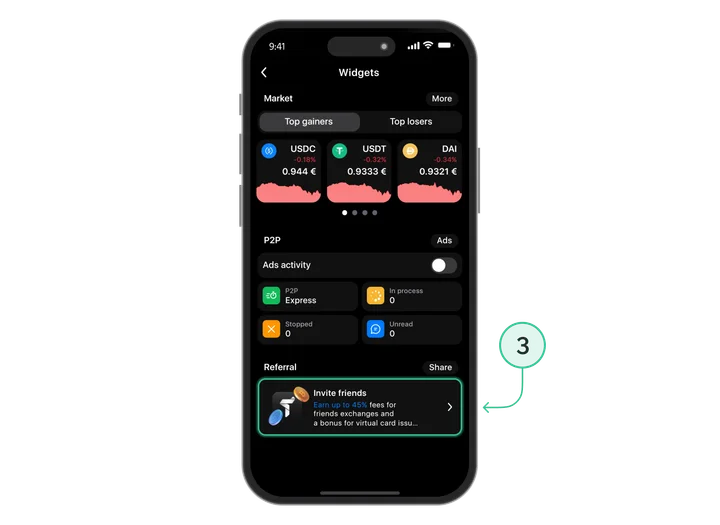
- Copy your referral link and send it to a friend.
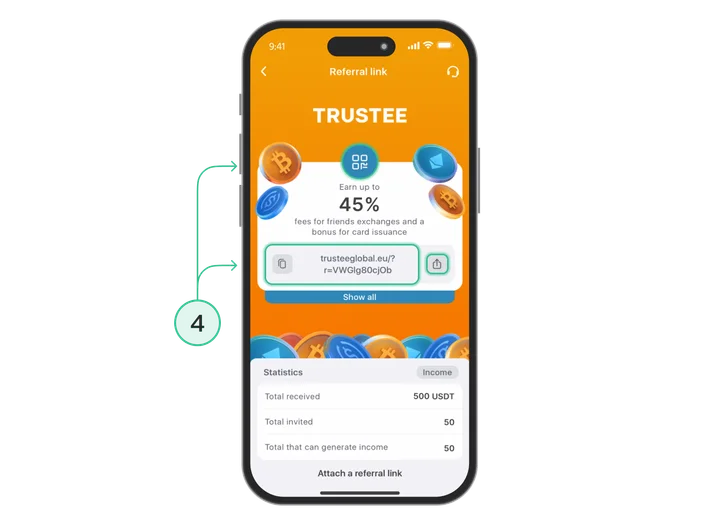
How does it work?
You don’t need to remind, control or “manage” referrals. They simply use the app, and you automatically receive your reward.
- Create several unique links for different audiences: friends, social media, events, contacts in your phone.
- Share them wherever it’s convenient for you.
- And just get on with your life.
Top 5 features of the Trustee Plus referral programme
1. Transfers by phone number
The most powerful feature that doesn’t even require you to send a referral link. All you need is your friend’s phone number and a bit of crypto on your balance.
Step-by-step guide:
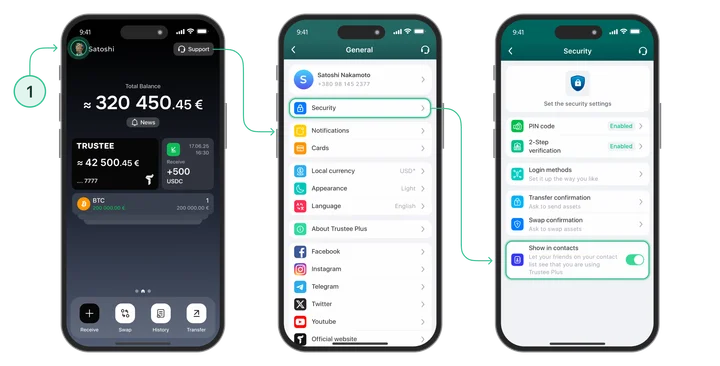
- When installing the app, allow access to your phone book. Or do it later via: “Settings” — “Security” — “Show in contacts”.
- Then go to the referral programme section and tap the “Share” icon next to the referral link you’ve chosen. A modal window will open, allowing you to invite contacts.
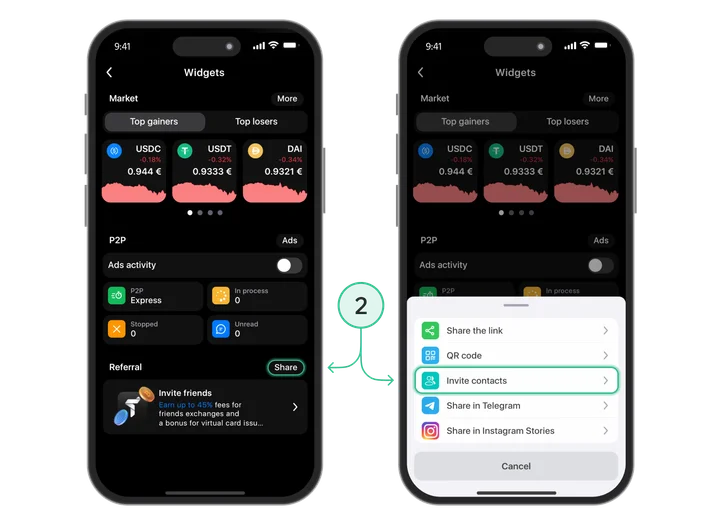
- At this stage, you’ll see a list of contacts in your phone book who haven’t yet installed the Trustee Plus wallet. Potentially, any of them can become your referral.
How to increase conversion by 76%
Now you can see exactly which of your contacts still doesn’t use Trustee Plus. Instead of sending a standard referral link, you can send them real cryptocurrency.
When the person installs the wallet, the funds are automatically credited to their balance, and the contact becomes your referral. What next?
- Top up your USDC balance with the amount you need for transfers. For example, if you have 25 contacts, top up your wallet with 50 USDC.
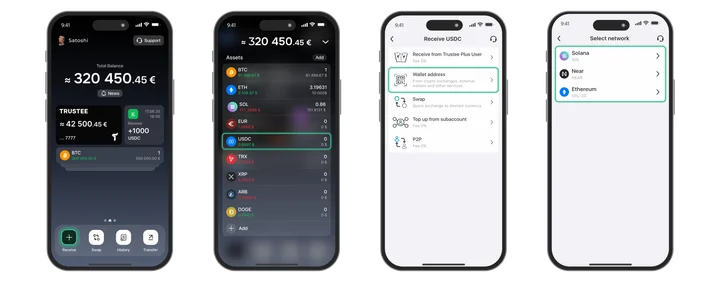
- Then open the USDC asset. Tap “Transfer” — “Instant transfer to a Trustee Plus user” — “By phone number”.
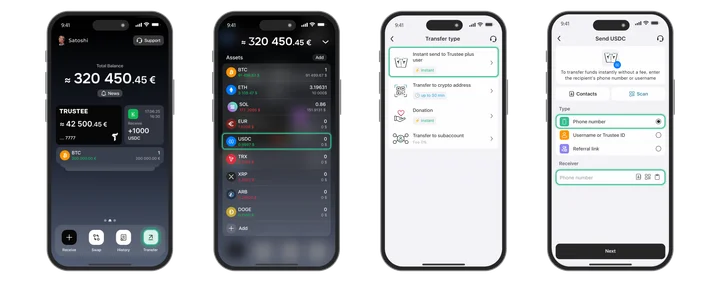
- You can send cryptocurrency to any person, even to someone who hasn’t yet installed Trustee Plus.
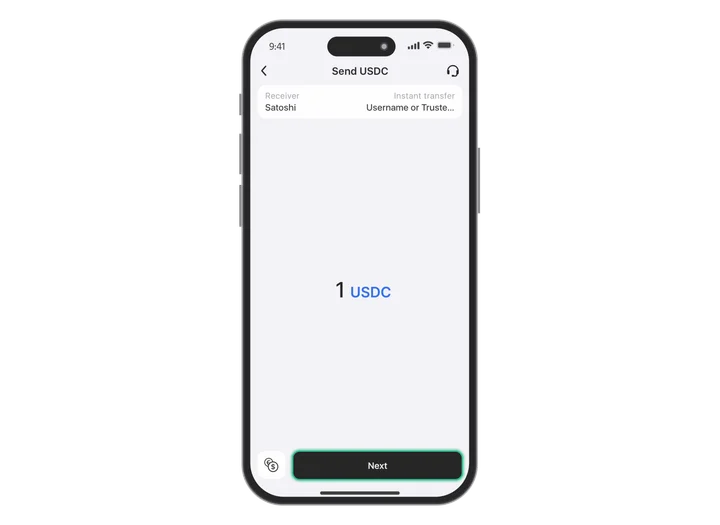
- The person receives an SMS/push notification that funds have been sent to them.
Tip 1: 14 days with no risk
If the person doesn’t install Trustee Plus within 14 days, you can return the transfer in a single tap. If there’s no referral, there’s no loss. The method is completely risk-free.
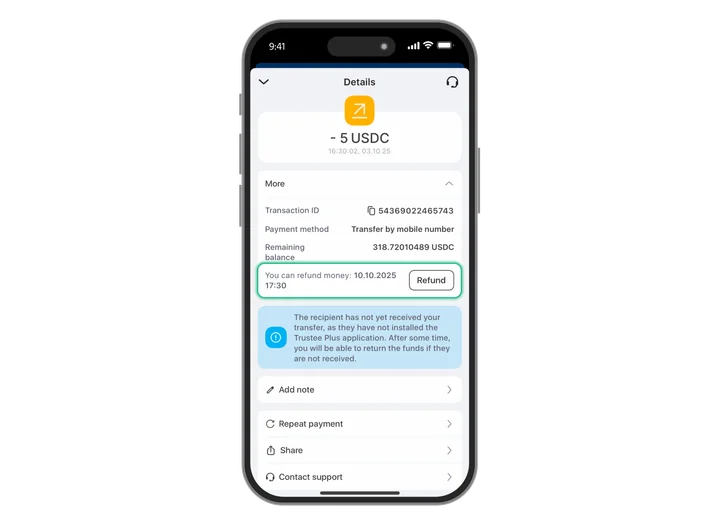
Tip 2: Why does this work?
2. Different links for different audiences
In Trustee Plus you can create an unlimited number of links, give them unique names and clearly see where your referrals are coming from. It’s mini marketing analytics right inside the app.
Step-by-step guide:
- Go to the referral programme section and tap “Create new link”.
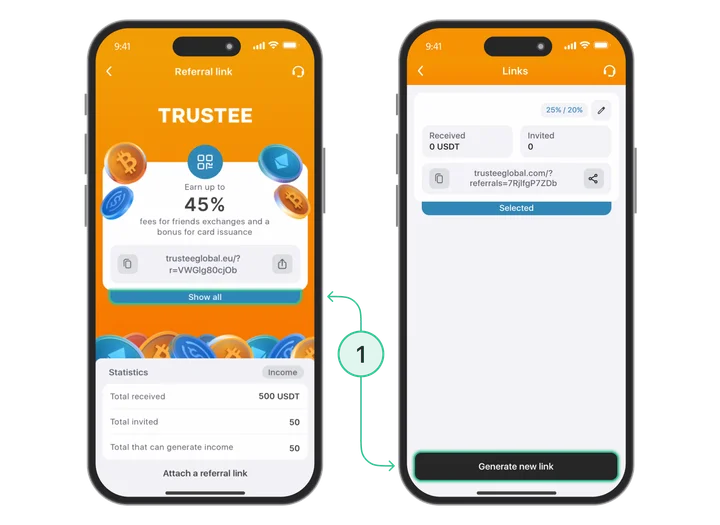
- Give the link a unique name so you can easily track the source of referrals. If necessary, create several options — for example:
-
-
- IG STORY
- CRYPTO CHAT
- OFFLINE EVENT
- FRIENDS & FAMILY
- BLOGER 1
-
Share these links across different channels.
Tip 3: Why does this work better?
You know exactly where your referrals are coming from, with no guesswork or chaos.
- You can see which channels really work: for example, IG Stories may bring 2–3 referrals per day, while crypto chats bring 20.
- You understand what’s worth scaling and what can be switched off.
- At the same time, you can test different formats, headlines and audiences.
In essence, it’s a full-fledged mini marketing system built directly into the app, available to everyone.
3. Earn up to 45% in referral rewards
Trustee Plus has two types of referral formulas. Before we look at them, here’s the main rule: the referral of my referral is also my referral.
Formula 1: 25%/20%
-
- 25% — from the fees of the user you invited directly
- 20% — from the fees of users invited by your referral
Formula 2: 20%/25%
-
- 20% — from your direct referral
- 25% — from the referrals of your referral
Why is this useful?
For example, you met an influencer at a conference and you know that he has a large audience. He can bring in a lot of new users, so it is more profitable to provide a referral formula of 20%/25%, because his audience will bring more invitations and, accordingly, more commissions.
If you meet an investor and you know they personally make large trading volumes, it’s better to set the 25%/20% formula for them, because their own activity will bring more benefit specifically to you.
Where do you set this up?
In the “Referral programme” menu you can:
- create separate links
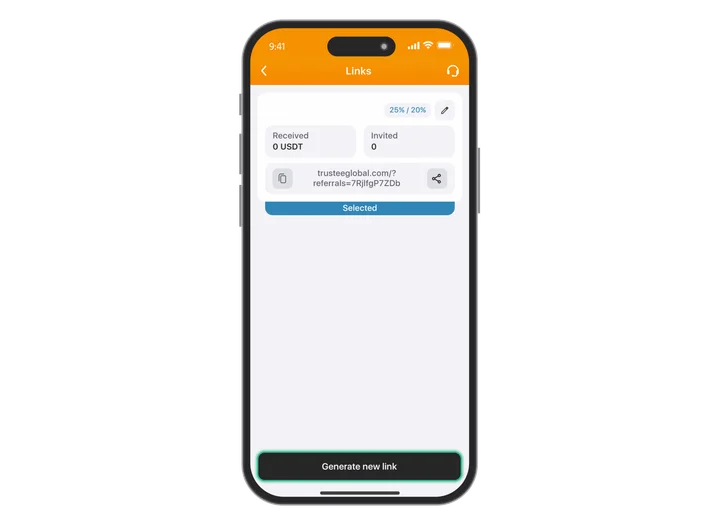
- give them names (for example: BLOGER 1)
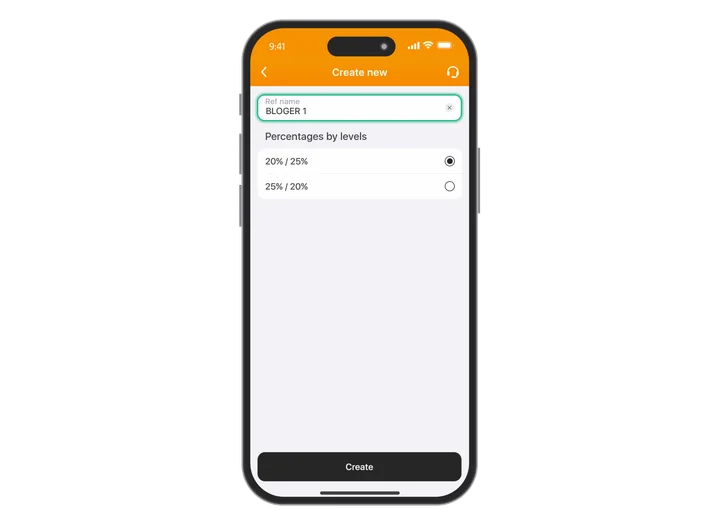
- choose a formula for each specific link (25/20 or 20/25)
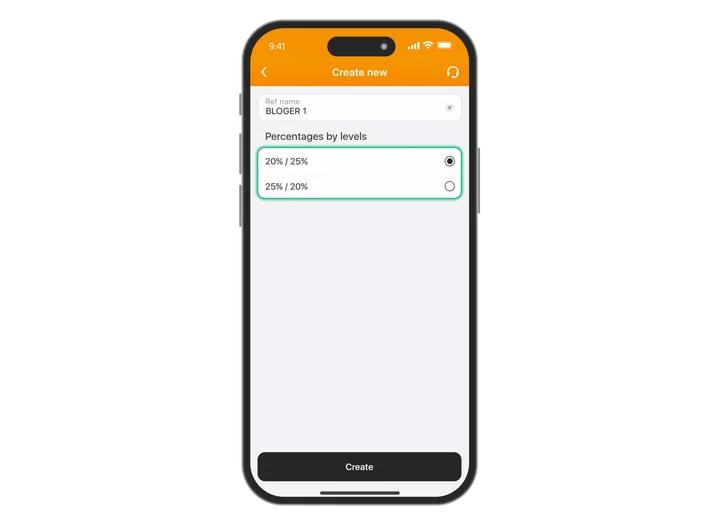
- change the formula at any time
For example:
-
- BLOGER 1 — 25%/20%
- Link: https://trusteeglobal.com/?referrals=sQrnVMcKNYb
The name is only visible to you in the application, and your friends only see the link. If necessary, you can change it at any time.
This means that today your BLOGER 1 link works according to the formula 25% / 20%, and tomorrow you can place it on other resources and change the formula to 20% / 25%. All this can be done at any time.
4. Sharing on social media
Trustee Plus has a built-in sharing feature that allows you to share your referral link in just a few seconds directly to Instagram or Telegram.
How to share a referral link on social media (using Instagram as an example):
- Open Trustee Plus and swipe left on the main screen.
- Tap the “Share” button.
- Select “Instagram”.
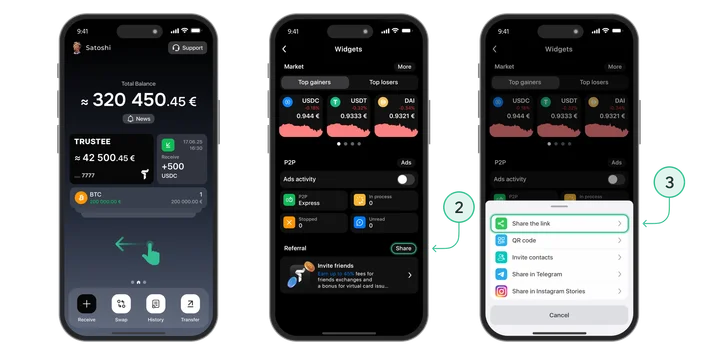
- You’ll be taken straight to Stories with a ready-made creative — you don’t need to do anything manually.
- Go back to Trustee — the app will immediately offer to “Copy referral link”.
- Copy the link, return to your Story and add it as a sticker.
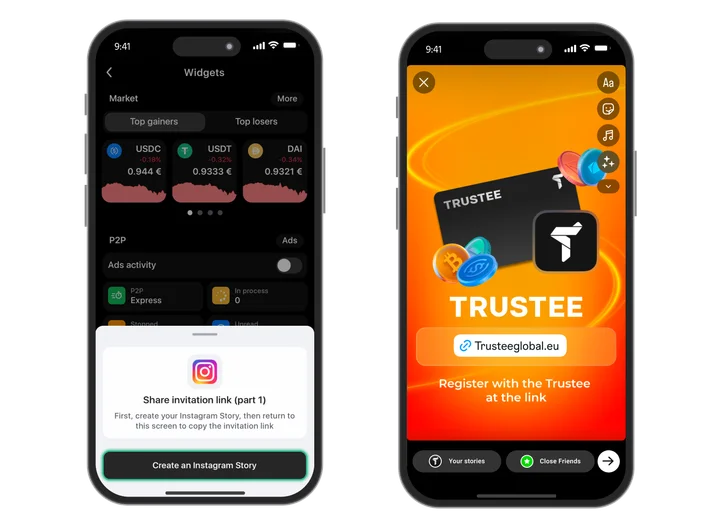
- Tap “Publish”.
In under a minute, you’ll have a nice branded Story and a clickable referral link.
Why does this work so well?
-
- A ready-made creative — no rendering, editing or extra preparation.
- About +200% more trust: the Story looks branded, not like “here’s my link”.
- Maximum speed: from idea to publication in just 30–40 seconds.
Want a steady flow of referrals? Just share Stories regularly on Instagram or Telegram. It’s the fastest and most cost-effective method: 30 seconds — and your link is seen by dozens or even hundreds of people.
5. QR code
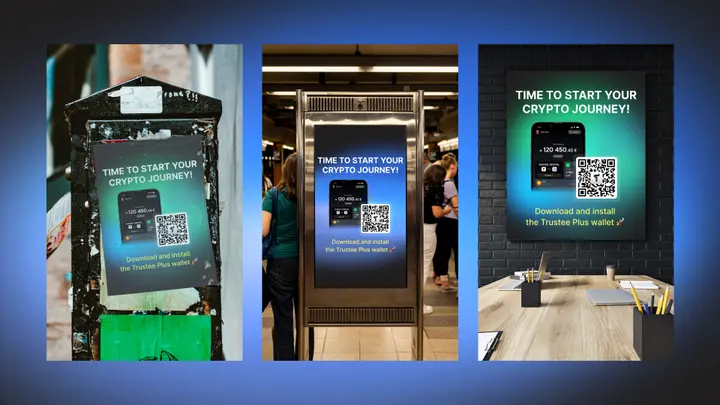
In digital products, everyone is used to links, but in real life a QR code is often the fastest way. It doesn’t require words, explanations or long instructions: you simply show your smartphone, and the person scans and instantly lands on the Trustee Plus installation page.
Simple, intuitive and incredibly effective.
How to use a QR code effectively:
1. Take a screenshot and always keep it handy.
-
- Open the “Referral programme” section in the app, open your QR code and take a screenshot.
- Save it to “Favourites”. When needed, just open it, turn the screen towards the person — and that’s it.
2. Set the QR code as your phone wallpaper (one of the most effective life hacks, often used at conferences).
-
- Just turn on the screen — and the QR code is immediately ready to scan. No need to search for a photo, open the app or explain anything.
- Press the power button — and the QR is already in front of your potential referral.
3. Use the QR code at events.
Any offline activity is an ideal place to collect referrals:
-
- conferences and exhibitions;
- meetups and themed gatherings;
- training events, co-working spaces, business networking.
A QR code is the fastest way to attract new users in almost any situation. It’s always at hand and always ready to work when there’s no time for explanations.
6. Bonus: personal referral link

Trustee Plus has a little-known but very useful feature — custom referral links. This isn’t just a tracking link with your code, but a branded and attractive link that automatically includes your referral code and looks much more professional to anyone you send it to.
You don’t change anything in your communication — you simply replace a long technical link with a neat personal version that’s pleasant to open, easy to remember and not embarrassing to send to friends.
To use this feature, you only need a few steps:
- Complete verification in Trustee Plus.
- Generate your referral link in the app.
- Fill in the form to get a custom design.
- Share the stylish version of the link with friends, in chats or on social media — and receive bonuses for new users.
Custom links are that very “little bit of magic” that increases the number of clicks without any extra effort. Unobtrusive but very effective.
Summary
The Trustee Plus referral programme is a simple yet powerful way to build your own source of passive crypto income.



