

Imagine it’s early November 2022. You wake up and, instead of your morning coffee, you’re “woken up” by the news: the FTX exchange has suspended withdrawals. Supposedly temporarily, but the very fact is frightening. A few hours later, the app and website stop opening altogether.
You stare at the screen and can’t process this “superposition”: the money seems to be there, but in reality it isn’t. Support goes silent, social media is buzzing, and everyone is talking about bankruptcy.
A familiar story of yet another centralised crypto exchange, which this time went bust not because of a hack or technical issues, but because of organisational ones. Namely, due to the misuse of clients’ funds. By the way, in March 2024, Sam Bankman-Fried (FTX CEO) was sentenced to 25 years in prison, but that’s a separate story.
It’s a good thing you didn’t keep your crypto assets only on a centralised exchange (CEX): you held a bit of liquidity on a DEX and kept some tokens in a cold wallet.
While thousands of FTX clients were counting losses after losing access to the cryptocurrency stored on that centralised exchange, you still had another tool — a DEX (a decentralised exchange). The funds you kept on a decentralised platform allowed you to act. Using them, you opened shorts on the FTX token and the SOL coin — because Alameda, a fund affiliated with the exchange, was one of the largest holders of that coin. It didn’t fully save the situation, but it helped to reduce losses to some extent.
This story is entirely real. The collapse of FTX exposed the weakness of centralised platforms. That’s when many people understood the difference between “I can see my balance” and “I actually own my crypto”.
Since then, the well-known crypto slogan “not your keys — not your crypto” stopped being just a catchy line for many and became the main rule of using cryptocurrency.
Now imagine an exchange that doesn’t hold your money at all, but simply helps you execute trades. Your crypto always stays in your wallet. No intermediaries, no risk that someone freezes your assets.
Sounds appealing?
In fact, this technology already exists — that’s how DEXs work. So, what is a DEX?
A DEX is a decentralised crypto exchange where cryptocurrencies are swapped directly between users via smart contracts.
Let’s take a closer look at how decentralised exchanges (DEXs) work, why they can be better than traditional exchanges, what risks exist, and why so many people became interested in DEXs after FTX.
How do DEXs work?

There are two main types: order book DEXs and AMM-based DEXs.
Order book DEXs (Order Book DEX)
This is like the classic model with an order book (the exchange “depth”) and lots of buy and sell orders. When your order matches someone else’s, a swap happens.
All these orders were stored on the Ethereum blockchain and processed via smart contracts, which means, first, delays, and second, it’s not cheap. That’s why Layer 2 solutions appeared — technologies that process everything off the main blockchain.
For example, dYdX works this way, combining the speed of centralised exchanges with decentralisation. You can even trade with leverage and futures there.
AMM-based DEXs (Automated Market Maker)
This is probably the most popular model right now. An AMM is like a robot exchange. It sets the price using maths, without any orders. Imagine a locker: you deposit ETH and withdraw USDT. The locker doesn’t look for buyers; it simply calculates how much USDT to give you, based on how much ETH and USDT it already holds.
The formula is simple: the amount of one token \ the amount of the other token = a constant.
For example, a pool has 10 ETH and 30,000 USDT. You decide to buy 1 ETH. ETH drops to 9, and USDT must rise to 33,333 so the constant stays the same. In other words, you paid 3,333 USDT for 1 ETH.
Liquidity pools (Liquidity Pools)
To clearly understand what a liquidity pool is, think of it as a reservoir or a kind of “piggy bank” filled not with coins, but with crypto tokens. The contents of this “piggy bank” power swaps on a DEX. What’s more, users themselves fill this “reservoir”. Why would they do that? Because they earn passive income for it.
How do you get in?
- You deposit two different cryptocurrencies so that their value is equal (for example, ETH worth $1,000 and USDT worth $1,000), although sometimes you can deposit a single coin and the split happens automatically.
- You receive special LP tokens that confirm you provided the funds.
- On each swap, users pay a fee, and part of that fee goes to you.
- When you want to withdraw, you simply swap the LP tokens back into cryptocurrency plus your share of the fees.
For example, if you add liquidity to an ETH/USDT pool on Uniswap with a 0.3% fee, where roughly $15 million is traded daily, and you provide $1,000 in ETH plus $1,000 in USDT, your income would be about 0.5–2 USDT per day or 15–60 USDT per month in a base scenario (APY 7–30%).
Overview of popular DEXs
Today, the decentralised exchange ecosystem is huge and growing fast. Not long ago, the top DEXs included Uniswap, PancakeSwap, Curve Finance, 1inch and dYdX, but recently new “faces” such as PumpSwap and OpenOcean have appeared and quickly climbed the rankings by 24-hour trading volume.
Let’s look at the most popular platforms worth your attention:
PumpSwap
A relatively new DEX focused on meme tokens and emerging cryptocurrencies that gain momentum quickly. According to data aggregators, this platform holds one of the leading positions by 24-hour trading volume (over $8 billion), showing high liquidity and active trading pairs.
Uniswap
A pioneer of the AMM model (launched in 2018) and the largest DEX on Ethereum. Easy to use, massive liquidity, supports thousands of tokens. It’s a kind of benchmark for most modern DEXs.
PancakeSwap
The most popular DEX on BNB Smart Chain (formerly Binance Smart Chain). Ideal for beginners due to low gas costs. In addition to trading, PancakeSwap offers staking, farming and various lotteries.
Curve Finance
Specialises in swapping stablecoins (USDT, USDC, DAI, etc.). It uses its own AMM formula optimised for stablecoins. If you need to swap $100,000 USDT for USDC, Curve will typically offer the best price among DEXs.
1inch
Technically, this isn’t a classic DEX but a DEX aggregator. 1inch searches for the best rate across dozens of decentralised exchanges and automatically splits your swap across multiple venues to optimise the final price.
OpenOcean
Another next-generation DEX aggregator: thanks to its own intelligent algorithm, it analyses liquidity pools, prices and fees across multiple blockchains and executes cross-chain crypto swaps, assembling the most advantageous routes across different decentralised protocols and networks.
dYdX
An order book-based DEX (mentioned above). It runs on its own Layer 2 solution and offers margin trading and perpetual futures — tools for experienced traders. If you want a professional exchange experience without centralisation, dYdX is a strong choice.
Raydium
A leading DEX on the Solana blockchain. Transaction speed is measured in seconds, and fees are fractions of a penny. It combines an AMM model with integration into Serum’s central order book, which can provide better liquidity and pricing.
DEX vs CEX comparison: pros and cons

As we’ve already established, there are two types of crypto exchanges: centralised and decentralised. Both have their advantages and supporters: CEXs offer simplicity and speed, while DEXs offer control over your funds and relative privacy. To choose what’s best for you, you need to understand the key pros and cons.
Here’s a CEX vs DEX comparison table focused on practical advantages and disadvantages:
|
Parameter |
CEX |
DEX |
|
Storage of funds |
The exchange stores users’ funds |
The user fully controls their assets |
|
Private keys |
Held by the exchange |
Held by the user |
|
Risk of account restrictions |
Possible freezes, geo restrictions, KYC blocks |
None |
|
Speed |
High |
Depends on the network |
|
Convenience |
Beginner-friendly interface |
Beginners must learn wallets, keys, networks, gas fees, etc. |
|
Liquidity |
Usually high, deep order books |
Lower than CEX, especially for niche pairs. Depends on liquidity pools |
|
Fees |
Exchange fees + hidden spreads |
Network fees + DEX protocol fees |
|
KYC and regulation |
Required |
Not required |
|
Transparency |
Limited; internal processes are not visible |
Full; all operations are on-chain |
|
Hack resilience |
Exchanges are an attractive target for hackers |
No single point of attack |
|
Fiat support |
Available |
Not available, which makes fiat onboarding harder for beginners |
|
Customer support |
Support service available |
No support; users are responsible for their own actions |
Main risks of using a DEX
Impermanent Loss
Impermanent Loss (IL), or temporary losses, is the most common and one of the biggest risks when using DEXs. This especially affects liquidity providers. IL occurs when the ratio of tokens in a pool changes and users end up with less value than they would have had by simply holding the tokens.
Example: you deposit 1 ETH ($2,000) + 2,000 USDT (total $4,000) into a pool. A month later, ETH rises to $3,000. If you had just held, you would have $5,000. But the pool rebalances, and you end up with 0.816 ETH ($2,449) + 2,449 USDT (total $4,898). IL is the $102 difference.
Why is it “impermanent”? Because if the price returns, the loss disappears. But it becomes real when you withdraw your liquidity.
When is IL the largest? When prices move sharply. If ETH doubles, IL is about 5.7%. If it increases fivefold, IL is already around 25%.
How can you reduce the risk? Choose stablecoin pools (USDC/USDT), make sure fees can cover potential losses, and avoid pairs with highly volatile coins.
Smart contract risks
Smart contracts power and automate DEXs, but they come with their own risks. Any bug in the code can be costly, and there is no undo button. Even after audits, you shouldn’t blindly trust protocols: an audit reduces risk, but it doesn’t make a system perfect. Code can contain vulnerabilities, and a hacker who finds a bug can drain funds from a pool.
How to reduce risks:
- Use established DEXs with audits
- Avoid new projects with unrealistic APY
- Diversify — keep different assets across different DEXs
- Don’t concentrate your crypto in a single protocol
- Use multiple crypto wallets
- Follow project updates on social media
Scam tokens
It’s no secret that tokens are being minted by just about anyone these days. Many are created simply to take your money. They promise the world, shout about “huge potential”, talk about “super projects” — but behind it all there’s emptiness and zero value.
The most common schemes are:
- Rug Pull: creators take the money and disappear.
- Honeypot: you can buy, but you can’t sell.
- Fakes: they copy the names of well-known projects.
How can you protect yourself?
- Verify the contract address on the official website.
- Check liquidity (under $50k is a red flag).
- Look at how many holders the token has.
- Check via TokenSniffer or RugDoc.
- Look for security audits.
- See whether the project’s socials are actually active.
User mistakes
On traditional exchanges, if you make a mistake and contact support in time, a transaction may sometimes be reversed. On a DEX, that won’t happen — this is serious.
Below are the most common user mistakes:
- Wrong address
You send tokens to a smart contract address or the wrong wallet instead of the recipient’s wallet — and that’s it, goodbye tokens.
- Wrong network
You send on Solana instead of Ethereum, or on SUI instead of BNB Chain — and the tokens can end up stuck somewhere in the blockchain forever.
- Gas set too low
You set the gas fee too low and the transaction gets stuck for an indefinite time.
- Uncontrolled slippage
You set 50% just to make sure it goes through — and end up buying at one and a half times the price.
- Ignoring warnings
Your wallet warns you about a suspicious smart contract and possible scammers, but you still click “OK” — and the funds are gone.
To avoid trouble:
- Triple-check the address before sending.
- Make sure the network is correct.
- Do a small test transaction first.
- Read what your wallet is telling you.
- Don’t rush. Better to spend 5 minutes checking than lose everything.
Phishing
Scammers clone popular DEXs and spread their links everywhere: in ad banners, on social media, and via email campaigns.
What it looks like:
- Fake domains, e.g., unisvvap.com instead of uniswap.com.
- Fake MetaMask extensions in the Chrome Web Store.
- Fake Uniswap Support Telegram bots.
- Pop-ups asking you to connect your wallet “for verification”.
What happens if you connect your wallet to such a site? You may grant criminals permission to:
- Access all your tokens.
- Transfer your NFTs.
- Change settings for your smart contracts.
Read more about phishing schemes in our Academy article “Phishing in cryptocurrencies: schemes, signs, protection”.
How to protect yourself:
- Save your favourite DEX links in bookmarks.
- Don’t click Google ads.
- Always check the URL before connecting your wallet.
- Keep large amounts on hardware wallets (Ledger, Trezor).
- Periodically review the permissions you’ve granted on Revoke.cash.
How to start using a DEX
Want to try decentralised exchanges? We recommend starting with small amounts and low-fee networks such as BNB Chain or Polygon. Once you’re comfortable, move on to Ethereum and larger sums. It’s not complicated — and we’ve prepared a simple step-by-step guide.
Step 1 — install a non-custodial wallet and set up a network (Ethereum, BSC, Polygon, etc.).
A non-custodial crypto wallet is your personal safe, where private keys are stored only by you. DEXs work only with these. Popular wallets include:
- MetaMask
A handy browser extension or mobile app. Works with Ethereum and other networks (BSC, Polygon, etc.).
- Trustee Wallet
A mobile wallet from the Trustee Team that supports many networks.
- Rabby Wallet
A great alternative to MetaMask: a multifunctional, user-friendly wallet that can switch networks automatically and show which DeFi tools and liquidity pools your funds are involved in.
- OKX Wallet
A mobile wallet from the OKX exchange that also supports multiple networks and is very easy to use.
Let’s look at the installation process using MetaMask as an example:
- Go to metamask.io
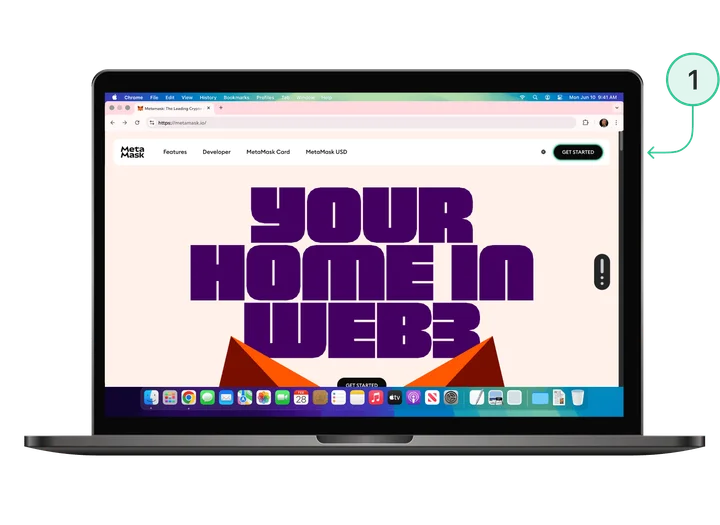
- Download the extension for your browser.
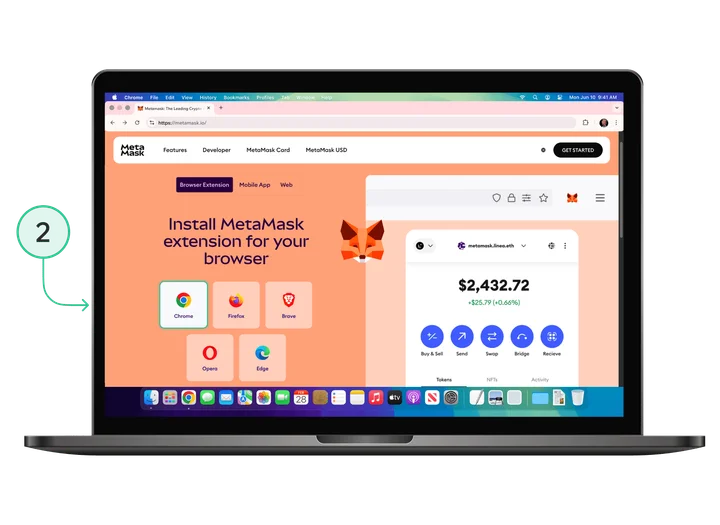
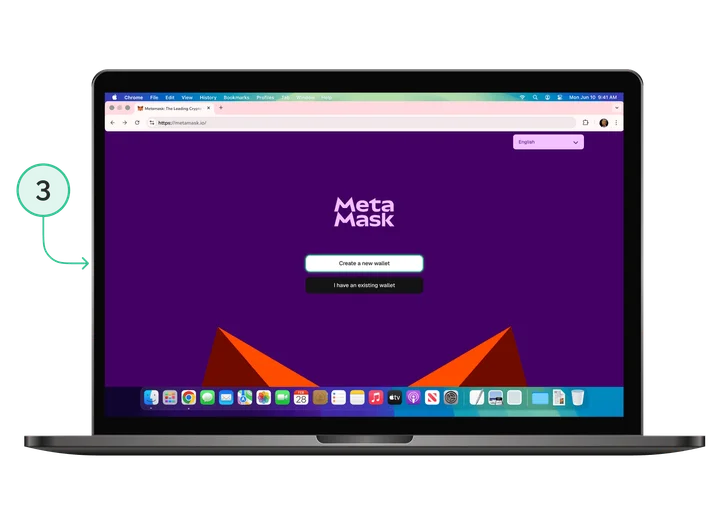
- Click Create a new wallet.
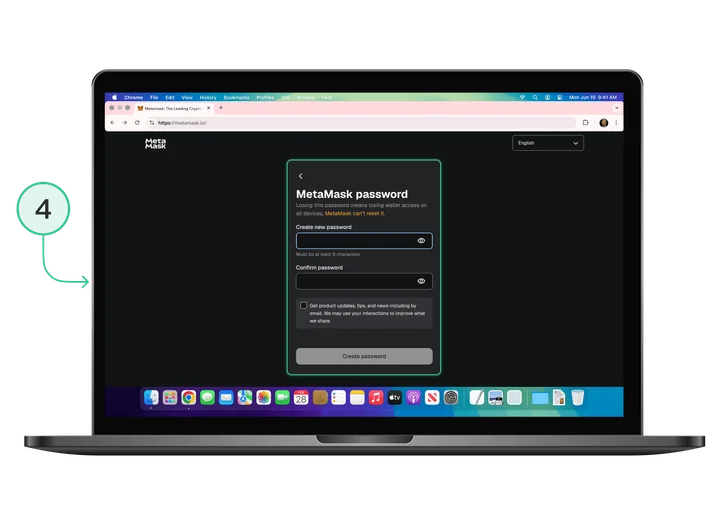
- Create a strong password.
- Write down your seed phrase (12 or 24 words) on paper. Never store it online.
- Confirm your seed phrase by placing the words in the correct order.
MetaMask works with Ethereum by default. But it’s better to start on a different network, so let’s set up BNB Smart Chain (BSC):
- Open MetaMask.
- Click the network list at the top.
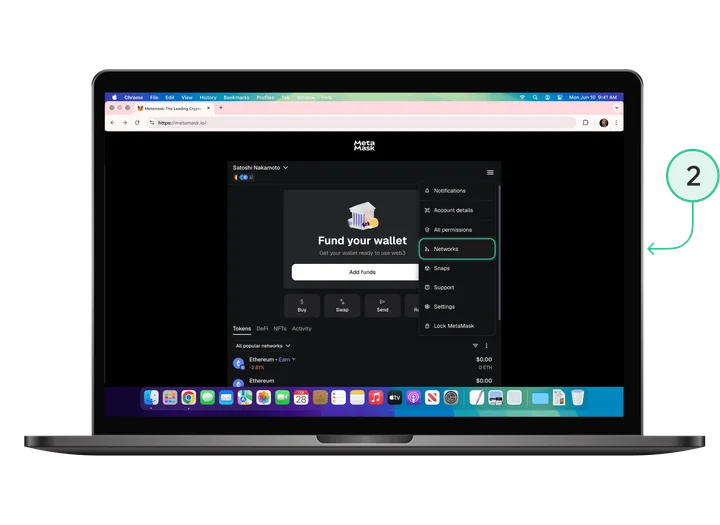
- Click Add network → Add network manually.
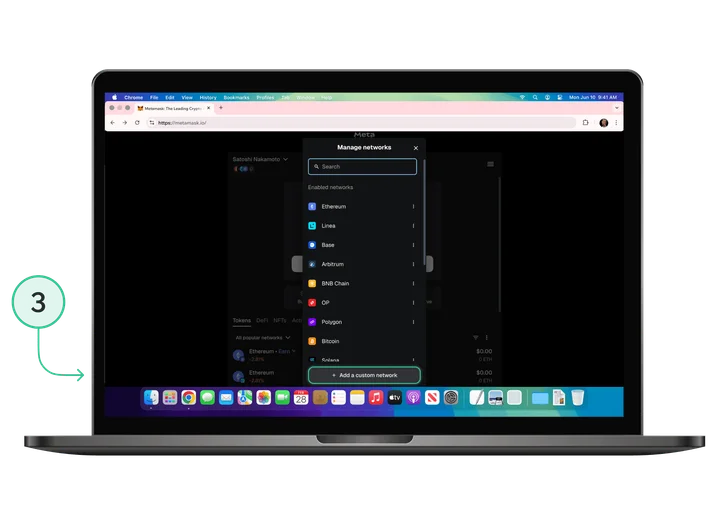
- Enter the BSC network details:
- Network Name: BNB Smart Chain
- RPC URL: https://bsc-dataseed1.binance.org/
- Chain ID: 56
- Currency Symbol: BNB
- Block Explorer: https://bscscan.com
- Save.
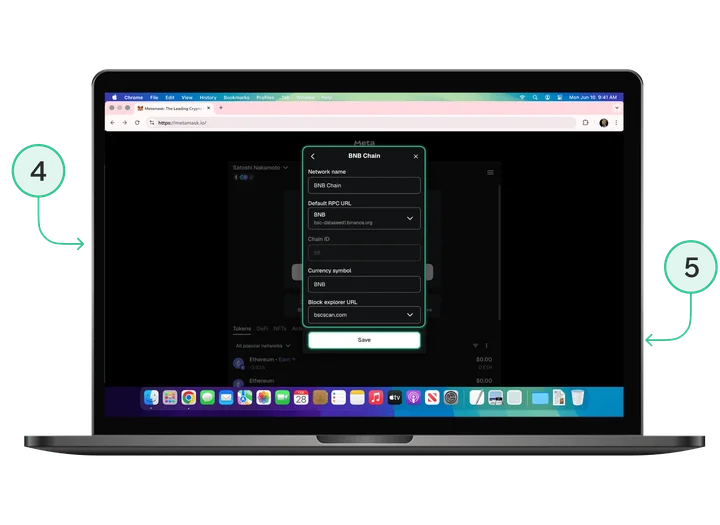
Or simply go to chainlist.org and add any network.
Step 2: top up your wallet
To pay network fees (gas), you need the native coin of the relevant network on your balance:
- Ethereum — ETH
- BNB Chain — BNB
- Polygon — POL
- Arbitrum — ETH
How to top up:
Buy on centralised exchanges such as Binance or Coinbase and withdraw to your MetaMask address on the required network. Or use MoonPay or Simplex, which are built into MetaMask.
How much you need to start:
- Ethereum: $50–100
- BNB Chain: $10–20
- Polygon or Arbitrum: $5–10
Step 3: choose a DEX for the required network.
Each DEX operates on specific blockchains:
- Ethereum → Uniswap, Curve, 1inch
- BNB Chain → PancakeSwap, Biswap
- Polygon → QuickSwap, Uniswap
- Arbitrum → Uniswap, Camelot
- Solana → Raydium, JUP, Orca
We recommend trying PancakeSwap on BNB Chain — it’s the easiest option thanks to low fees.
Step 4: connect your wallet to a DEX.
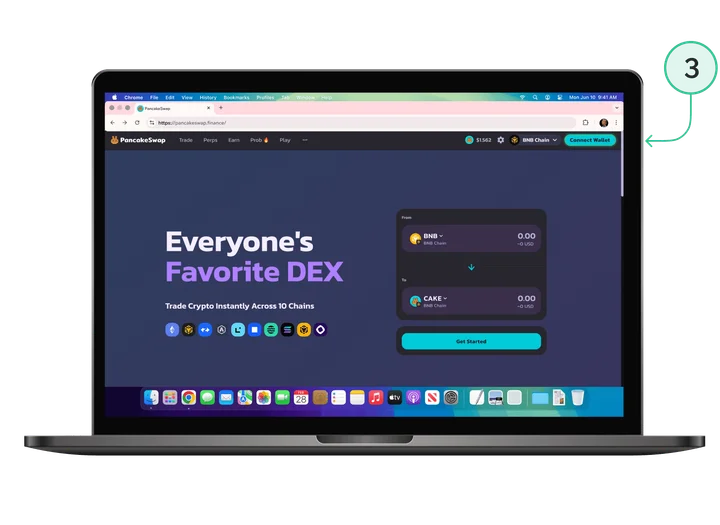
- Open the decentralised exchange PancakeSwap.
- Check the website address: https://pancakeswap.finance/
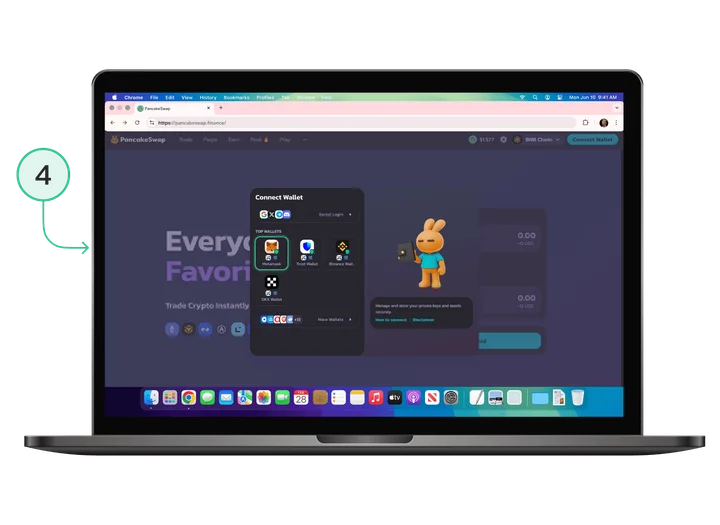
- Click Connect Wallet in the top right.
- Select MetaMask.
- Confirm the connection in the MetaMask pop-up.
- Make sure BNB Smart Chain is selected.
A DEX can see your wallet balance, but it can’t do anything without your permission, because every action requires your signature.
Step 5: make your first swap.
Now for the most interesting part — swapping tokens on a DEX.
1. Choose the tokens to swap.
- Top: the token you’re selling (e.g., BNB).
- Bottom: the token you’re buying (e.g., USDT).
- You can change a token by clicking its name.
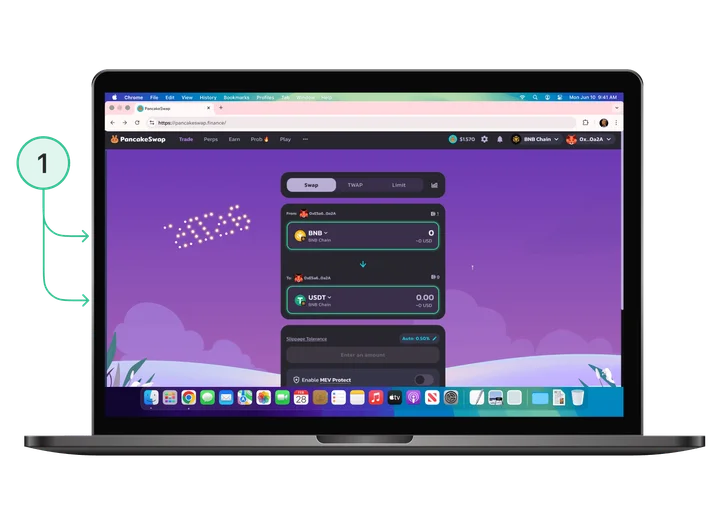
2. Enter the amount.
- Enter the amount in the From or To field.
- The site will show how much you’ll receive.
- You’ll see the exchange rate.
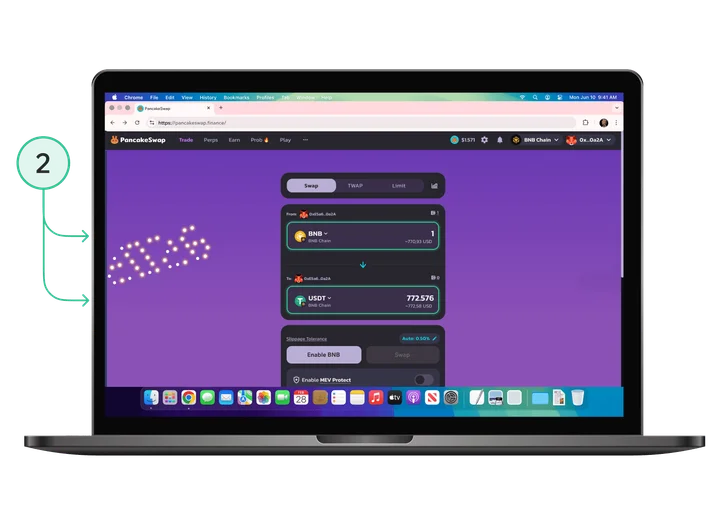
3. Review the details.
- Price Impact — how your swap affects the price. If it’s over 3%, it’s better to split the swap into several parts.
- Minimum Received — the minimum you’ll receive.
- Liquidity Provider Fee — the pool fee (usually 0.25%).
- Route — which pools the swap goes through.
4. Set Slippage Tolerance.
- Click the settings cog.
- Typical: 0.5%.
- For volatile tokens: 1–2%.
- Don’t set more than 5% “just because” — you may end up buying at a worse price.
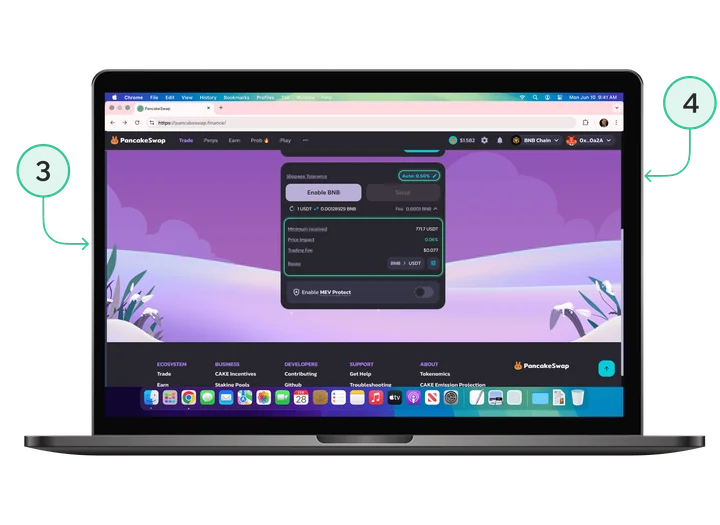
5. For your first swap: enable the token.
- If you’re swapping a token for the first time, you must grant the DEX permission to use it.
- Click Enable BNB (or another token).
- Confirm in MetaMask.
- This costs a small amount of gas.
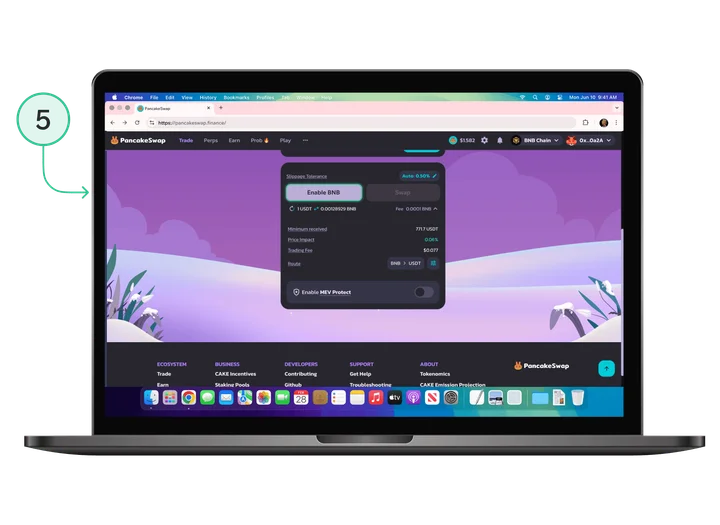
6. Make the swap.
- Click Swap.
- Review everything in the confirmation window.
- Click Confirm Swap.
- Confirm in MetaMask.
- Wait for completion.
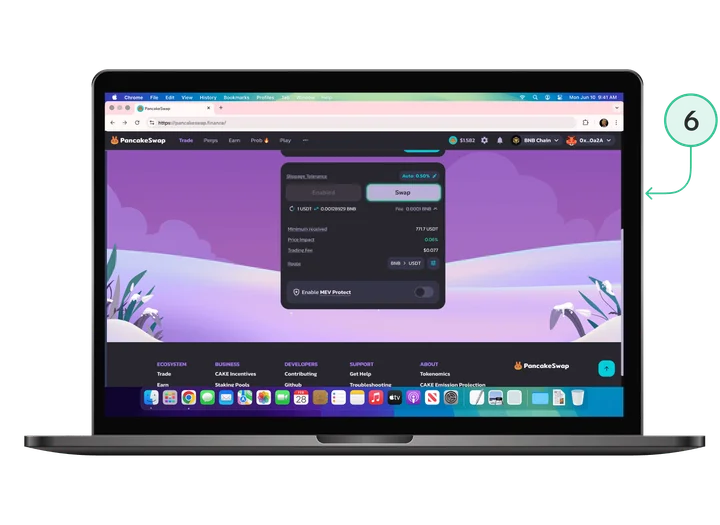
7. Check the result.
- The tokens will appear in your wallet.
- You can view the transaction in a Block Explorer (BSCScan for BNB Chain).
Congratulations! You’ve made your first swap on a decentralised exchange and become part of DeFi. But this is only the beginning: you can go on to staking, farming and other tools offered by decentralised finance.
Once you’re comfortable, try other networks and DEXs. On Polygon, transactions are almost free. Ethereum has the deepest liquidity. Solana is incredibly fast. Experiment — but start with small amounts.
Conclusion
Decentralised exchanges (DEXs) are not just an alternative to centralised giants like Binance or Coinbase. They are the foundation of a new financial system where everything is open and transparent, where there is no censorship, and where any user can become a market maker or liquidity provider.
DEXs provide a certain level of sovereignty and complete freedom in how you manage your money. You control your assets, and no one can tell you what to do. But remember: with great freedom comes great responsibility.
DEXs and CEXs are not competitors, but rather different tools. Traditional exchanges are convenient for spot and futures trading and let you quickly buy or sell crypto with fiat money. Decentralised exchanges are for those who want full control, are interested in innovation, and want to use all the advantages of DeFi.
Start small: try swapping a little on PancakeSwap and learn how liquidity pools work. Explore different networks — and when you feel confident, move on to more advanced strategies.