



























How do you replenish your euro crypto wallet (EUR)
Follow these steps to replenish your EUR balance. You only need a bank card.
- Click on the “Receive” button on the home screen;
- Choose the currency to deposit – euro (EUR);
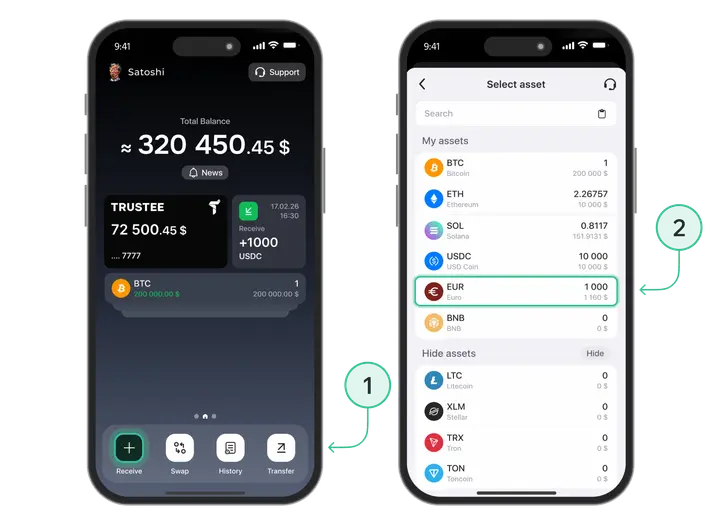
- Click on the “Using debit or credit card” button;
- Enter your card details or choose a previously added card. You can deposit EUR only with Euro currency cards of Visa, MasterCard systems;
- Enter the deposit amount and click on the “Top Up” button;
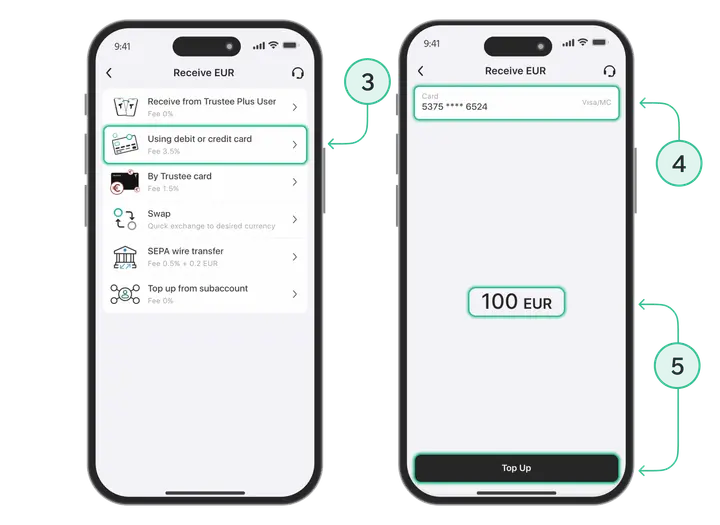
- Enter the card details, if necessary;
- Confirm the payment.
The function is available only for verified users. Go through verification.
Install Trustee Plus - a crypto wallet with payment card!
All the benefits in one app




This website uses cookiesIn order to ensure the functionality of the Website and to prepare a statistical analysis of the website visitors' navigation methods, we use cookies. Manage preferences