



























Solana (SOL) staking
How to stake Solana
- Go to the asset page.
- Click on the coin icon in the bottom right corner below the balance.
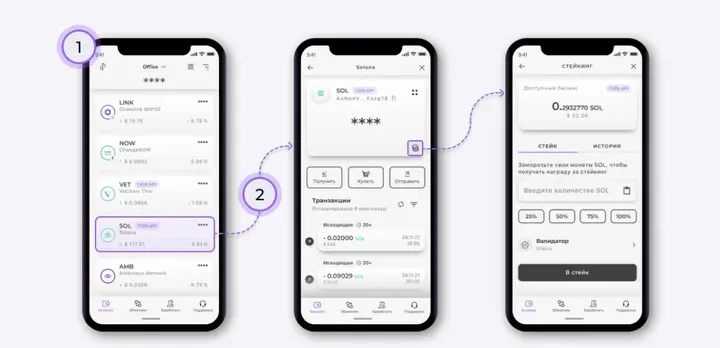
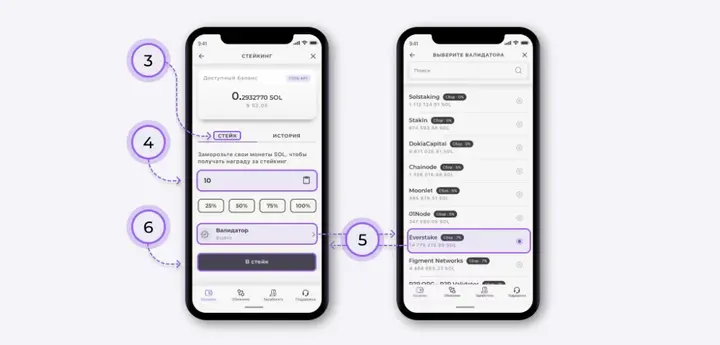
- Select the "Stake" feature.
- Enter the number of coins to stake SOL manually or as a percentage of your total balance.
- Select the validator you want to delegate coins to from the list provided.
- Confirm the staking by clicking the "To Stake" button. Once the confirmation message appears, your stake will be successfully activated.
How to withdraw SOL from staking
- Go to the "History" tab.
- Click on the bar labeled "Staked."
- In the submenu that opens, click "Deactivate."
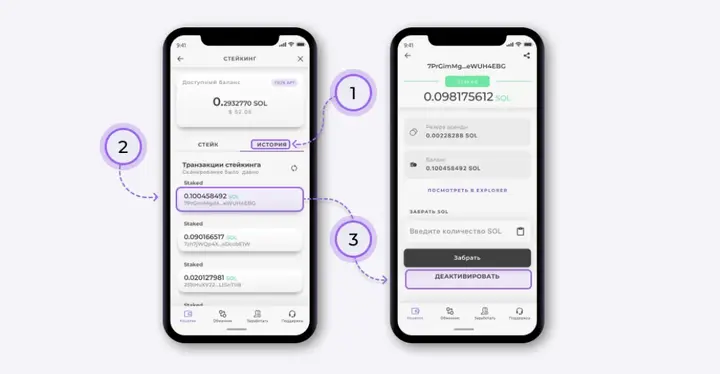
This will deactivate the stake and unfreeze the coins at the end of the current "Epoch", tentatively 3-4 days later.
Wait the necessary time for the coins to unfreeze and go to the same screen again, where you can click on the "Take All" button. SOL together with the accrued rewards will be added to your wallet balance.
Install Trustee Plus - a crypto wallet with payment card!
All the benefits in one app




This website uses cookiesIn order to ensure the functionality of the Website and to prepare a statistical analysis of the website visitors' navigation methods, we use cookies. Manage preferences