






























One of the core principles of the cryptocurrency world is transparency. All users have equal access to complete information about how a network operates. This transparency is made possible through blockchain explorers – specialized services that track all blockchain activity since its inception.
In this article, we’ll explore what blockchain explorers are, why they’re important, and how to use them.
What Is a Blockchain Explorer?

In large-scale projects like Bitcoin and Ethereum, transparency is a fundamental value, offering full visibility into the process of mining and processing transaction blocks. While in the early days of the crypto industry it was difficult to access such data, today numerous services present this information in a user-friendly format.
Using a simple search bar, users can find any block, review its contents, verify any address with all associated transactions, or track any transfer – including its status and fee.
Transparency and Security in Blockchain
The blockchain maintains a complete record of all transactions, starting from the very first block. Any node (network participant) can download the full copy of the blockchain to their device.
All nodes constantly interact with each other. Each transaction first enters the mempool – a dynamic queue of unconfirmed transactions. Once miners or validators confirm it, the transaction is added to a block. Each new block is cryptographically linked to the previous one, ensuring data immutability and preventing deletion.
Who Needs a Blockchain Explorer and Why?
Blockchain explorers are accessible websites, making them convenient tools for users who want to track their transactions – to verify status and, if needed, decide whether to adjust fees.
They also provide extensive statistical data for in-depth blockchain analysis. On any explorer’s main page, users can find key network metrics:
-
Cryptocurrency price – average rate from multiple exchanges with a price chart.
-
Estimated hash rate – a metric of network computational power affecting security and processing speed.
-
Current network transaction fee.
-
Number of mined blocks and confirmed transactions in the last 24 hours.
-
Mempool size – total volume of unconfirmed transactions.
-
Latest unconfirmed transactions.
This information is useful for various types of users:
-
Developers – for analyzing network capacity, diagnosing transaction delays, and evaluating blockchain performance.
-
Miners – for real-time tracking of new block generation.
-
Wallet owners – to monitor transaction status and wallet balances.
-
Market analysts – for trend analysis and strategic forecasting.
Market Analytics Opportunities
For market analysts, explorers open a wide range of opportunities. While wallet addresses remain anonymous, their transaction history and balances are publicly visible. Traders track major asset movements (even with the help of bots) between wallets and exchanges to determine potential trading strategies.
For instance, large transfers from mining pools or whales (major asset holders) to exchanges are often interpreted as signals of upcoming sell-offs, suggesting a potential price drop. Conversely, when whales accumulate assets instead of moving them to exchanges, this may indicate a bullish trend.
In short, blockchain explorers offer an enormous array of tools for analyzing the blockchain from virtually every angle.
How Do Blockchain Explorers Work?
In the early days of Bitcoin and other cryptocurrencies, there were no publicly available explorers. Interacting with blockchain data and transaction history was only possible via command-line tools.
There are many blockchain explorers – some are official services by cryptocurrency developers, others are third-party platforms covering multiple blockchains. While they differ in design, they operate on the same principle.
Understanding Blockchain Transactions
Before learning how to track transactions using an explorer, let’s clarify what a transaction is and how it enters the blockchain.
A transaction is the transfer of assets from one address to another.
In networks like Bitcoin and Ethereum, the user can set this fee manually. If the fee is too low or the network is congested, the transaction may remain unconfirmed in the mempool for a long time.
Miners prioritize transactions with higher fees and smaller sizes, as they’re more profitable and more can fit into a block. Low-fee transactions may stay in the mempool or even be dropped entirely. This especially affects Bitcoin and Ethereum, where confirmation can take hours or days, and fees may reach hundreds of euros in rare cases.
Key indicators to monitor include:
Transaction Confirmation Time
Depending on the Bitcoin network hash rate, transaction size, and fee, transactions may remain in the mempool for 10 minutes to several days or even weeks. Increasing the fee improves the likelihood of faster confirmation.
For example, according to the BTC blockchain explorer, in 2024 the average transaction confirmation time ranged from 39 minutes to 9,125 minutes.
Transaction Size (Weight)
Every transaction has a weight (size) measured in bytes:
-
Each input (source of funds): ~148 bytes
-
Each output (destination): ~34 bytes
-
The base transaction itself: ~10 bytes
Transaction Statuses
Each transaction in an explorer will be marked with one of three statuses:
-
Not Found – the transaction may have had too low a fee, spent time in the mempool, dropped to the bottom of the queue, and was ultimately rejected.
-
Confirmed – the transaction succeeded, and funds have been transferred.
-
Pending – the transaction is waiting in the mempool for confirmation or rejection.
How to Track a Transaction Using an Explorer
Once a transaction enters the mempool, it becomes trackable via a blockchain explorer. You’ll need at least one of the following:
-
Transaction hash – a unique ID found in the sender’s wallet under transaction details.
-
Wallet address – of either the sender or the recipient.
To track a Bitcoin or other blockchain transaction, simply enter the hash or wallet address into the explorer’s search bar. The related transaction data will be displayed immediately.
Tracking transactions is as easy as using Google – the whole process takes seconds when data is known.
Tracking Transactions with Trustee Wallet
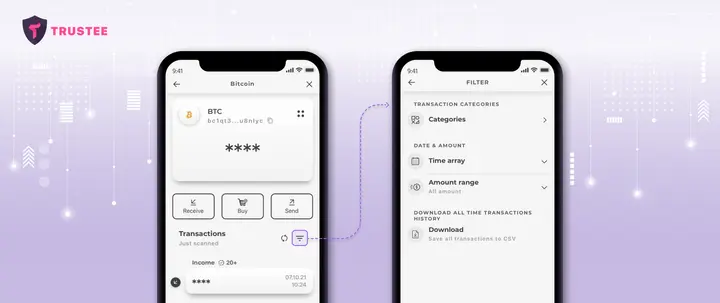
While explorers provide rich analytics, many users only care about their own transaction history. For them, it’s more convenient to use wallets with built-in explorer features.
Trustee Wallet, for example, displays all transactions for each of your coins or tokens. You can filter by incoming, outgoing, or canceled transactions, search by date range or amount.
What Information Can You Get?
Depending on what data you input (hash, block height, or address), you can obtain:
By Transaction Hash:
-
Sender and recipient addresses
-
Amount transferred
-
Fee paid
-
Mempool status
-
Number of confirmations
-
Timestamp and confirmation status
By Block Number:
-
List of confirmed transactions and their data
-
Total transaction volume
-
Block timestamp, size, difficulty, and total fees
-
Miner who generated the block
By Wallet Address:
-
Total transactions made
-
Sent and received amounts
-
Current balance
-
List of all transactions and their statuses
Advanced Information
By diving deeper into a blockchain explorer, you can uncover extra insights such as:
-
Market data: coin market cap, circulating supply, and exchange volume
-
Block details: average block size, transaction count per block, confirmation times
-
Mining data: hash rate distribution, network difficulty, miner rewards, fees
-
Network activity: unique/new addresses, mempool transaction rate
Popular Blockchain Explorers for BTC and Other Cryptocurrencies

Bitcoin (BTC) Blockchain Explorers:
-
Blockchair.com – multi-language explorer covering over 40 cryptocurrencies including BTC, DOGE, Cardano, DASH, Monero, and BNB Chain.
-
BTC.com – user-friendly interface for Bitcoin, Ethereum, Bitcoin Cash, and Litecoin.
-
Bitcoin.com – by the Bitcoin Cash team; also offers wallet, educational content, and news.
-
Blockchain.com – features a robust BTC blockchain explorer with historical data.
-
Mempool.space – focused on Bitcoin and its Layer 2 Lightning Network.
Trustee Wallet links directly to explorers. Clicking any coin icon brings you to its explorer. For BTC, Trustee uses Blockchair.com.
Ethereum (ETH) Blockchain Explorers:
-
Etherscan.io – Ethereum’s main explorer with deep analytics.
-
Ethplorer.io – portfolio tracker and explorer with charting, export features.
Blockchair.com also supports Ethereum data.
Tron (TRX) Blockchain Explorers:
Tron uses PoS (Proof-of-Stake) rather than PoW (Proof-of-Work). Popular explorers include:
-
Tronscan.org and Tron Explorer – support validator monitoring, staking analytics, and smart contract interaction.
Trustee Wallet uses Tronscan.org for TRX transaction tracking.
USDT Blockchain Explorers
Tether (USDT) is a stablecoin issued on multiple blockchains – Bitcoin, Ethereum, and Tron. Each version uses the protocol of its native chain:
Use the appropriate explorer depending on the protocol:
-
ERC-20 – Etherscan.io
-
TRC-20 – Tronscan.org
There is no fundamental difference between explorers for regular users. Differences lie mostly in analytics depth and user interface.
Conclusion
Blockchain explorers offer powerful insights into the entire blockchain history, starting from the genesis block. This opens a vast field of research for blockchain developers and analysts, driving the evolution of this groundbreaking technology.





