





























A transaction hash is a unique identifier that allows users to track cryptocurrency transactions and verify their authenticity. As cryptocurrencies gain popularity, risks such as fraudulent transactions, counterfeit tokens, and the use of test networks for scams also increase.
In this article, we will explain what a transaction hash is, why it is important, how to check it using the Trustee Plus app, and how to protect yourself from potential threats. This information will be useful for both beginners and experienced users.
Key Takeaways
- A transaction hash, also known as a Transaction ID or TXID, is a unique identifier for a cryptocurrency transaction that can be used to find and verify the operation on the blockchain.
- By entering the hash into a blockchain explorer, users can check the network, transaction status, sender and recipient addresses, transferred amount, fee, timestamp and number of confirmations.
- The explorer must correspond to the network on which the transfer was made: for example, Tronscan for Tron, Etherscan for Ethereum and ERC20 tokens, and a suitable Bitcoin explorer for Bitcoin.
- The existence of a transaction hash alone does not prove that funds were successfully received. Before completing a transaction, verify the status, network, amount, recipient address, confirmations and official token contract.
- Testnet transactions and transfers of counterfeit tokens have no value on the main network, so all transaction details should be checked independently rather than relying on screenshots or information provided by the sender.


What Is a Transaction Hash?

A transaction hash (also called a TXID) is a cryptographic string generated based on transaction details, such as sender and receiver addresses, transfer amount, and execution time.
This unique identifier is usually a fixed-length (64-character) hash value produced by the SHA-256 algorithm. The hash allows each transaction in the blockchain to be uniquely identified, regardless of its size or complexity.
In networks like Bitcoin and Tron, the transaction hash is used to quickly search for and verify transactions in blockchain explorers such as Bitcoin Explorer or Tronscan.
Why Is a Transaction Hash Important?
A transaction hash serves several key functions in the blockchain:
-
Transaction Identification
The hash acts as a unique identifier, ensuring that each transaction can be found in the blockchain without confusion. In Bitcoin, where an average block is 1 MB in size and contains over 2,000 transactions, using a hash allows for instant access to the required operation.
-
Verification of Authenticity
Since the hash is immutable, any modification to transaction data would render it invalid. This is a crucial feature that ensures transparency and prevents forgery. In the Tron network, for example, the hash helps verify whether a transfer was executed in the main network (Mainnet) rather than a test network (Testnet).
-
Confirmation Tracking
A hash is used to track the confirmation status of a transaction. In Bitcoin, for instance, a transaction is considered final after one block confirmation (approximately 10 minutes), and this can be checked using a blockchain explorer.
-
Proof of Funds Transfer
In OTC deals or online payments, providing a transaction hash serves as proof that the transfer was completed. This reduces disputes and allows the recipient to verify the authenticity of the transaction.
How to Check a Transaction Hash in Trustee Plus
To check a transaction hash in the Trustee Plus app, follow these steps:
- On the main screen or within the selected cryptocurrency menu, tap on the “History” icon.
- Find the transaction based on its execution time and open the details.
The transaction details will display its status, sender and receiver addresses, and the transaction hash (TXID).
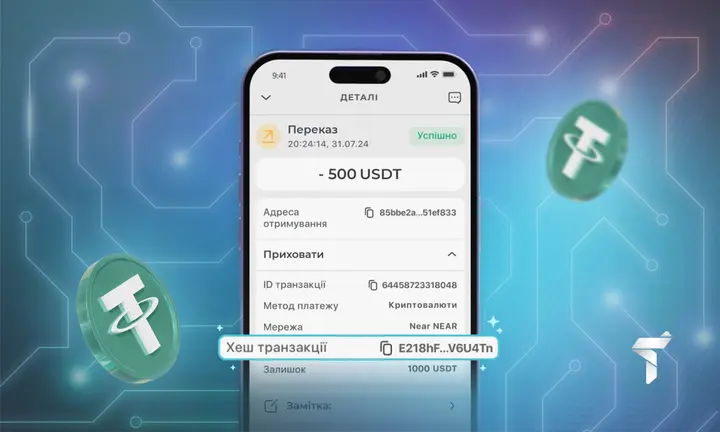
How to Check a USDT TRC20 Transaction Hash:
- Open the Trustee Plus app, select USDT TRC20, and go to transaction history.
- Find the transaction you want to check and open its details.
- Copy the transaction hash (TXID).
- Open the Tronscan blockchain explorer (tronscan.org), paste the hash into the search bar, and view the transaction details, including status, confirmation time, and network (Mainnet).
How to Check a Bitcoin Transaction Hash:
- Open the Trustee Plus app, select Bitcoin (BTC), and go to transaction history.
- Find the transaction and open its details.
- Copy the transaction hash.
- Open a Bitcoin blockchain explorer such as Blockchain.com, paste the hash into the search bar, and review confirmation status, number of confirmations, transaction fee, and other technical details.
Other Blockchain Explorers for Checking Transaction Hashes
A transaction hash can be found in cryptocurrency wallets, exchanges, or payment services used for sending or receiving cryptocurrency. Once a transaction is completed, the Transaction ID (hash) will be displayed in its details. This hash can then be verified using blockchain explorers that provide complete information about the transaction.
Here are some popular blockchain explorers:
-
Bitcoin (BTC):
-
- Blockchain.com: Displays transaction status, confirmation count, fees, and block details.
- Blockchair: Provides additional Bitcoin blockchain analytics, including address history and activity.
-
Ethereum (ETH) & ERC20 Tokens:
-
-
Etherscan: The most popular Ethereum explorer, showing hashes, transfer amounts, token contract details, and confirmations.
-
-
Tron (TRX) & USDT TRC20:
-
-
Tronscan: Allows users to verify transactions in the Tron network, including addresses, amounts, and status.
-
-
Solana (SOL):
-
-
Solscan: Enables users to check transaction status in both the main network and testnet.
-
-
Litecoin (LTC):
-
-
BlockCypher: Displays Litecoin transaction status, confirmation times, and blocks.
-
-
Ripple (XRP):
-
- XRPSCAN: Shows XRP transaction details, including status and transfer IDs.
How to Check a Transaction Hash:
- Copy the Transaction ID (hash) from the platform where the transaction was made.
- Paste it into the appropriate blockchain explorer (depending on the cryptocurrency).
- Check key details: transaction status, number of confirmations, sender and recipient addresses, and transfer amount.
This allows you to quickly verify the authenticity of an operation, prevents data falsification, and helps avoid fraud.
Security Tips
Scammers often use fake or incomplete tokens to deceive users. One of the most common scams involves test networks (testnet), where transactions have no real value.
For example:
- In the Tron network, fake transactions may appear in Nile Testnet instead of the real Tronscan Mainnet.
- In Solana, fraudulent transfers can be checked in Solscan Testnet, which is different from the main network.
To avoid scams, always verify transaction hashes in official blockchain explorers.
If a transfer was made on a test network, it is not valid for real transactions. Also, verify the token contract to ensure you are receiving genuine tokens.
If a transaction hash leads to a different USDT contract, the token is fake.
Scammers also use fake sender addresses or incorrect transfer amounts that do not match agreements. To confirm transaction authenticity, always check the sender and recipient addresses, transfer amount, and confirmations in a blockchain explorer.
Conclusion
A transaction hash is a powerful tool for verifying cryptocurrency transactions, ensuring transparency, and protecting against fraud. For maximum security, always check the hash in blockchain explorers, verify the network (Mainnet, not Testnet), and compare the token contract with official data.
Frequently Asked Questions About Transaction Hashes
What is a transaction hash?
A transaction hash is a unique cryptographic identifier assigned to an operation on a blockchain. It may also be called a Transaction ID, Transaction Hash or TXID. It allows users to find a specific transaction in a blockchain explorer and check its main details.
Where can I find a cryptocurrency transaction hash?
The hash is usually available in the transaction history of a crypto wallet, exchange or payment service. Open the relevant transaction and view its details. The identifier may be labelled “Hash”, “Transaction ID”, “Transaction Hash” or “TXID”.
How do I check a transaction hash?
Copy the hash and paste it into the search bar of a blockchain explorer that supports the relevant network. Then check the transaction status, amount, sender and recipient addresses, fee, network and number of confirmations. Different blockchains require different explorers.
Can a transaction hash be treated as proof of payment?
A hash helps locate a transaction, but it is not sufficient proof that a payment has been completed successfully. The transaction may still be unconfirmed, may have failed, may have been made on a test network or may involve a counterfeit token. The recipient should independently verify all details in a blockchain explorer.
How do scammers use transaction hashes?
Scammers may provide the hash of a Testnet transaction, show a transfer with a different amount or recipient address, or send a counterfeit token with a name and symbol resembling the genuine asset. To stay protected, verify the network, status, recipient address, amount and official token contract address.