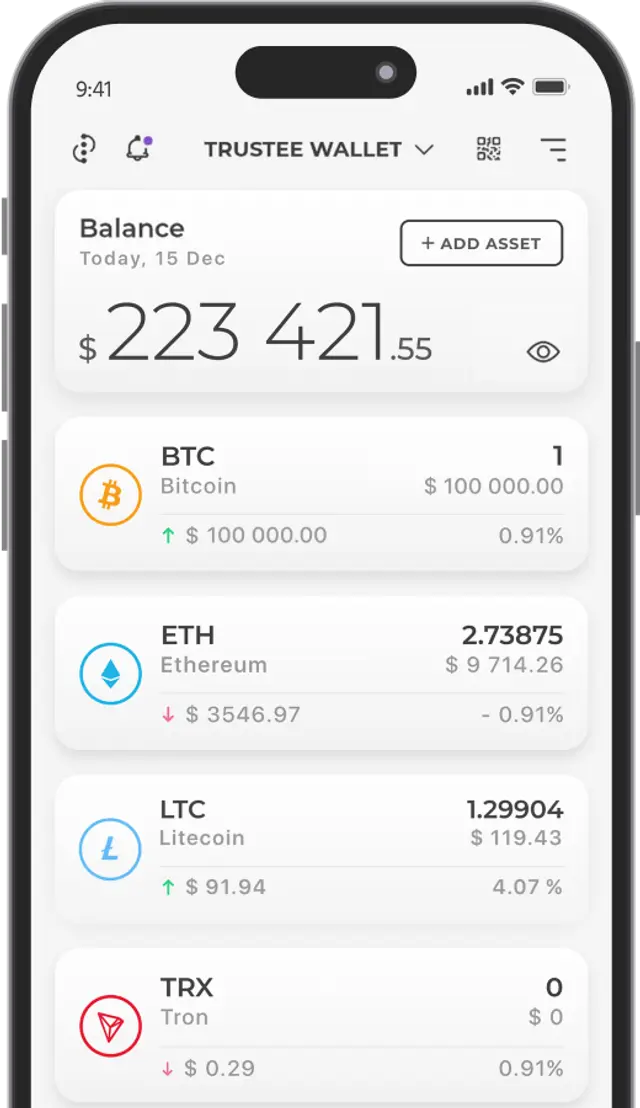






























A Bitcoin transaction is a transfer of BTC between addresses on the Bitcoin network — that is, the creation, signing and broadcasting of an operation in which unspent outputs from previous transactions are used as inputs, while new outputs are assigned to the recipient and, where necessary, returned to the sender as change.
Key Takeaways
- A Bitcoin transaction can be tracked by its TXID as soon as it has been broadcast to the network and appears in the mempool of the node used by the blockchain explorer. There is no need to wait for the first confirmation before tracking it.
- Confirmation speed depends primarily on the fee rate in sat/vB, the transaction’s virtual size, current mempool congestion and miners’ policies. The amount being transferred does not determine the fee by itself.
- Bitcoin uses the UTXO model: a wallet spends one or more unspent outputs, creates a payment to the recipient and usually returns the remaining amount to a separate change address.
- If a transaction remains unconfirmed for a long time, you can wait, use Replace-by-Fee where supported or apply another available method of increasing the fee. Creating a new transaction with the same funds without taking the previous operation into account may result in a conflict.


How Bitcoin Transactions Work

A user can track a BTC transfer after the signed transaction has been broadcast to the network and accepted into the mempool of the node whose data is used by the crypto wallet or blockchain explorer. Miner confirmation is not required before tracking can begin: the first confirmation appears only after the transaction has been included in a block.
Once the user has created and signed a transaction, the wallet sends it to one or more network nodes. Each node independently checks the operation against the consensus rules and its own mempool policy. If the transaction passes validation, the node adds it to its mempool and relays it to other network participants. There is no single global mempool, so different nodes and blockchain explorers may detect the transaction at different times.
Transactions sent by BTC users compete for limited space in the next block. Miners and mining pools generally prioritise operations with a higher fee rate relative to their virtual size — sat/vB. The more unconfirmed transactions there are in mempools and the higher their proposed fee rates, the greater the competition for inclusion in the next block.
A BTC transfer has three key parameters:
- the network fee and its rate in sat/vB;
- the transaction weight and virtual size;
- the current status and number of confirmations.
Bitcoin Transaction Weight and Virtual Size
Every BTC transfer has a weight measured in weight units, or WU. Fees are generally calculated using the virtual size — or vsize — measured in virtual bytes, or vB. In simplified terms, vsize is equal to the transaction weight divided by four and rounded up. The value depends on the number of inputs and outputs, the types of addresses and scripts used, the presence of SegWit data and other parameters. The more UTXOs used as inputs and the more outputs created, the larger the virtual size. The weight, vsize, inputs and outputs can be viewed in a Bitcoin blockchain explorer.
Bitcoin Network Fees
To have a transaction included in a block, the user assigns a network fee that is received by a miner or mining pool. The total fee is determined by the operation’s virtual size and the selected rate in sat/vB. The user may choose the rate manually or use the crypto wallet’s automatic estimate. A higher competitive rate generally increases the likelihood of quick confirmation, but it does not provide an absolute guarantee of inclusion in a particular block.
If the rate is significantly below the current competitive level, the transaction may remain unconfirmed for several hours, days or longer. Individual nodes may also remove it from their mempools over time because of memory limits, changes to the minimum relay fee, a conflict with another transaction or local settings. Nodes do not “set aside” such an operation until more expensive transactions disappear: while it remains in the mempool, it continues to compete for inclusion in a block.
How Bitcoin Transaction Fees Are Calculated
Before sending Bitcoin, it is useful to check the current recommended fee rates. Modern interfaces usually display them in satoshis per virtual byte — sat/vB — rather than simply in satoshis per ordinary byte. Current estimates can be viewed, for example, on mempool.space or another blockchain explorer. You also need to know the transaction’s estimated virtual size. The formula is: total fee = fee rate × virtual size. For example, with a fee rate of 4 sat/vB and a size of 120 vB, the total fee would be 4 × 120 = 480 satoshis.
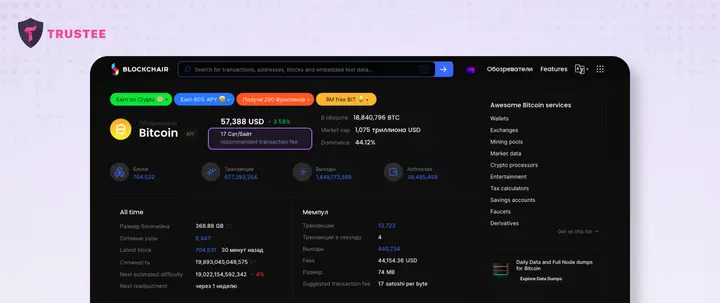
The recommended sat/vB rate is usually calculated automatically by the crypto wallet when the transaction is created. The estimate is based on current mempool congestion, recent blocks and the approximate number of blocks within which the user wants to receive confirmation. As conditions change constantly, the estimate cannot guarantee an exact time.
How Crypto Wallets Determine Fees
Most modern crypto wallets automatically estimate the network fee and offer one or more speed options. Some applications allow users to set the sat/vB rate manually, while others use automatic calculation only. It would be incorrect to claim that all ordinary wallets set the maximum fee by default: algorithms and available settings vary.
How Fees Are Determined in Trustee Wallet
The ability to choose an appropriate network fee is one of the features of Trustee Wallet.
When using the service, the user can:
- send a transaction using the network’s recommended fee rate;
- set the fee rate manually;
- choose a suitable option from the available estimates based on the expected processing speed: fast, medium or slow.
How to Set a Fee Manually in Trustee Wallet
To choose a fee, you need to create a transaction and enter its main parameters. It is important to remember that the likelihood of quick confirmation depends not on the total fee alone, but primarily on its rate relative to the transaction’s virtual size and the current level of competition in the mempool.
To send BTC and choose the fee manually:
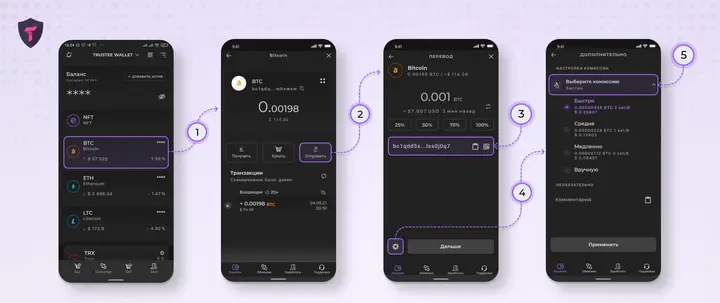
- Open the BTC tab.
- Select “Send”.
- Enter the recipient’s address and carefully check the network, address and amount.
- Open the fee settings menu. Depending on the version of the application, it may be represented by a button with a cog symbol or located in the additional transaction settings.
- Select one of the proposed fee options corresponding to the estimated confirmation speed: fast, medium or slow. The higher the competitive sat/vB rate, the greater the likelihood of earlier inclusion in a block. Where the relevant function is available, the rate can also be entered manually in this menu. The names and positions of interface elements may change after application updates.
BTC Transaction Statuses
Wallet and blockchain explorer interfaces generally display three main states:
- Awaiting confirmation. The transaction has been broadcast to the network and detected by the explorer but has not yet been included in a block. It may be present in the mempool of one or more nodes. The existence of a TXID alone does not guarantee that every node has accepted the operation.
- Not accepted, removed or replaced. A transaction may fail validation because of an invalid signature, conflicting inputs, failure to comply with relay rules, an excessively low fee rate or other reasons. A transaction that was previously accepted may also be removed from a local mempool or replaced by another operation through Replace-by-Fee. This is not a single universal blockchain status, but a description of the situation provided by a particular wallet or explorer.
- Transaction confirmed. The operation has been included in a valid block. When the next block appears, the depth increases to two confirmations, then three and so on. The recipient may treat the payment as final after the number of confirmations they consider appropriate.
How to Track a Bitcoin Transaction on the Blockchain
BTC transfers can be tracked using a blockchain explorer. Such a service displays public data from the Bitcoin network, including the transaction status, inputs, outputs, fee, virtual size, confirmations and the block in which it was included. Below, we examine tools for checking a Bitcoin transaction independently.
What You Need to Find a Transaction
To track a BTC transfer, you need to know one of the following identifiers:
- Transaction hash — TXID. This is a unique transaction identifier calculated from its data. To view the details of the operation, paste the TXID into the blockchain explorer’s search bar. SegWit transactions also have a wtxid that includes witness data, although ordinary users usually need the TXID.
- Recipient address. You can enter it into a blockchain explorer, after which the service will display the public history of incoming and outgoing operations associated with the address. You will then need to find the required payment. Bear in mind that different services may display an address balance and history differently.
- Sender address. The process is similar to searching by the recipient’s address. However, a single transaction may use several inputs belonging to different addresses, while change is often sent to a new wallet address.
One of the listed identifiers is sufficient to obtain information about a transfer, but a TXID usually provides the most accurate and fastest search. Do not publish an address unnecessarily if you do not want your activity to be associated with your identity: blockchain data is publicly accessible.
Where to Track BTC Transactions
The following blockchain explorers can be used to check the status of a Bitcoin transaction:
- Mempool.space. An open Bitcoin explorer that displays transactions, blocks, fee rates, the estimated position of an operation in the mempool, RBF and Lightning Network data.
- Blockstream Explorer. An open blockchain explorer containing data on Bitcoin, Testnet and Liquid, including transactions, addresses, blocks and fees.
- Blockchain.com Explorer. A well-known explorer that allows users to search for Bitcoin transactions, blocks and addresses.
- Blockchair. A multichain explorer providing detailed data on Bitcoin transactions and several other blockchains. Its interface allows users to analyse inputs, outputs, fees and additional parameters.
- BTCScan. A Bitcoin blockchain explorer for searching transactions, addresses and blocks, as well as viewing information about the current state of the network.
- Bitaps. A Bitcoin explorer providing information about transactions, blocks, addresses, balances and network statistics.
What Information a Bitcoin Blockchain Explorer Shows
A blockchain explorer can provide the following public information about a BTC transaction:
- input addresses or scripts;
- output addresses or scripts;
- the amount of each output;
- the change output, where it can be identified;
- the total transaction fee;
- the fee rate in sat/vB.
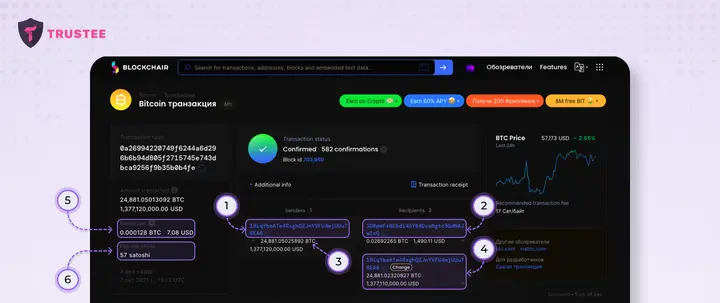
The explorer may also display the TXID, wtxid, virtual size, weight, RBF status, detection time, block number, number of confirmations and information about related transactions. The transfer data contains all inputs and outputs, allowing the movement of BTC to be analysed. An operation may have one or more inputs and one or more outputs.
If a transaction contains several inputs and outputs, this means that several UTXOs were used to create it and several new outputs were generated. However, it cannot be stated with certainty that all inputs belong to different wallets or that every output represents a separate recipient: some outputs may be change, while several inputs may be controlled by the same user. Such transactions usually have a larger virtual size.
For example, to view the inputs of a transaction in Blockchair, paste the TXID into the search bar, open the operation page and go to the inputs or senders section. The term “sender” is conditional in this context: the Bitcoin protocol works with UTXOs and scripts rather than a banking model based on a single sender account.
Suppose a wallet uses a UTXO worth 1.00586790 BTC and sends 0.00586790 BTC to the address 1Thj4bksGv8Unvk8gUteo6Tpuodh5YurtB. If the fee is 0.00001000 BTC, the transaction will create an output of 0.00586790 BTC for the recipient and a change output of 0.99999000 BTC. The change is usually sent not to the original address 1Trv2m4bsT9fg7KhU6n4VKHJ7GkhgcWw, but to a new change address automatically generated by the same wallet. The sum of the inputs therefore equals the sum of the outputs plus the fee.
How to Track a Bitcoin Transaction in Trustee Wallet
The following information may be available for a transaction created in the wallet:
- the TXID or hash;
- the current status;
- the fee amount and rate;
- the amount sent;
- the recipient’s address.
More detailed information can be viewed in a blockchain explorer. Trustee Wallet provides a link to the transaction page in an explorer. To use it:
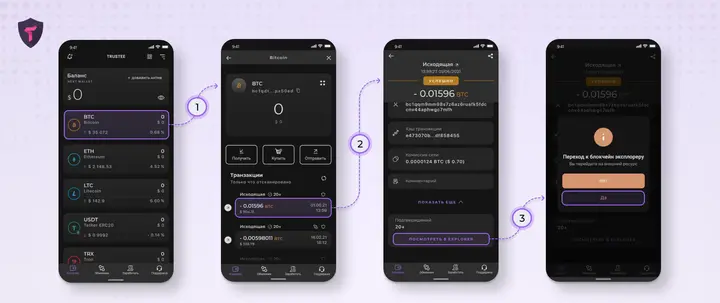
- Open the BTC tab in the application.
- Select the required transaction — brief information about it will appear on the screen.
- Select “Details”, followed by “View in explorer”. The application will open the transaction page in a blockchain explorer, where you can check its status and confirmations. Button names and locations may vary depending on the version of the application.
Examples of Bitcoin Transaction States:
- Confirmed. For example, a transfer may have 147 confirmations. One confirmation may be sufficient for a small payment, although the recipient determines the exact requirement. Exchanges, swap services and merchants may wait for several confirmations, particularly for large amounts.
- If the message “Ooops! We could not find what you’re looking for” appears during a search, it does not necessarily mean that the transaction was rejected. The reason may be an incorrect TXID, a delay in explorer synchronisation, temporary service unavailability, removal of the transaction from a particular node’s mempool or its replacement through Replace-by-Fee — RBF. RBF creates a new conflicting transaction with a higher fee. Depending on the wallet, it may accelerate the transfer or replace it with an operation containing modified outputs, but “cancellation” is not guaranteed until the replacement is confirmed.
- Pending. The transaction has been detected but has not yet been included in a block. This does not always mean that there is no problem: the fee rate may be insufficiently competitive, the operation may depend on unconfirmed parent transactions or it may not comply with the policies of some nodes. After inclusion in a block, the status will change to “Confirmed”.
What to Do with an Unconfirmed BTC Transaction in Trustee Wallet
If a transaction remains unconfirmed for a long time or is no longer displayed in the mempool, the available actions depend on its parameters, status and the functions supported by the particular wallet.
Depending on the situation, the following options may be considered:
- Resending. If the original transaction is no longer accepted by nodes and the funds are available in the wallet again, a new operation can be created using a current fee rate. Before resending, you must make sure that the previous transaction can no longer be confirmed; otherwise, a conflict involving the same UTXOs may arise.
- Waiting. There is no exact waiting period. A transaction may be confirmed within several minutes, hours or days, or remain unconfirmed for longer. It may also be removed from the mempools of some nodes. There is no guarantee that the operation will definitely be confirmed or permanently rejected after 2–3 days.
- Increasing the fee. If the transaction supports Replace-by-Fee and the wallet provides this function, a replacement operation with a higher fee rate can be created. In Trustee Wallet, open the BTC history, select the unconfirmed transaction and select “Speed Up”, then choose one of the proposed rates or enter one manually. The new transaction must pay a sufficient additional fee to comply with the nodes’ replacement rules.
The acceleration function may be available in Trustee Wallet for BTC, ETH, DOGE and ERC20 tokens such as Tether USDT, although the technical mechanism depends on the network. Bitcoin uses the replacement of a conflicting transaction with a higher fee, while account-based networks use a new operation with the same nonce and a higher fee. The availability of the function and supported assets should be checked in the current version of the application.
Conclusion
This article has provided detailed answers to the following questions:
- How to track a BTC transaction.
- How transactions are processed on the Bitcoin network.
- What transaction statuses may occur.
- How the fee is calculated and how the user can choose its rate.
- What determines the confirmation speed of a transaction on the Bitcoin blockchain.
- What can be done to speed up an unconfirmed transaction.
We have also considered examples of confirmed and unconfirmed transactions, the reasons why a network node may refuse to accept an operation or remove it from the mempool, and the differences between ordinary waiting, resending and Replace-by-Fee.
Frequently Asked Questions About Bitcoin Transactions
How Long Does a Bitcoin Transaction Take to Confirm?
There is no fixed confirmation time. A new Bitcoin block appears approximately once every ten minutes on average, but an individual interval may be considerably shorter or longer. Whether a transaction is included in a block depends on its fee rate, virtual size, mempool congestion, unconfirmed ancestors and miners’ decisions. The waiting period may range from several minutes to several days or longer.
How Can I Check a Bitcoin Transaction Using Its TXID?
Copy the TXID from the crypto wallet’s transaction history and paste it into the search bar of a blockchain explorer such as Mempool.space, Blockstream Explorer or Blockchair. The service will show whether the transaction is in the mempool, whether it has been included in a block, how many confirmations it has received and the fee it paid.
Why Is My BTC Transaction Taking So Long to Confirm?
The most common reason is that the fee rate is below the current competitive level. The transaction may also depend on an unconfirmed parent operation, have a large virtual size, conflict with another transaction or fail to comply with the policies of certain nodes. Its estimated position in the mempool can be checked using the TXID.
Can a Bitcoin Transaction Be Cancelled or Accelerated?
A confirmed transaction cannot be cancelled. An unconfirmed operation may sometimes be replaced through Replace-by-Fee if it allows replacement and the wallet supports the relevant function. Some wallets may also use Child Pays for Parent. An attempted “cancellation” involves creating a conflicting transaction and does not guarantee a result until one of the operations has been included in a block.
How Many Bitcoin Confirmations Are Considered Sufficient?
The number depends on the recipient’s requirements and the amount. For a small payment, the recipient may accept one confirmation or even an unconfirmed operation at their own risk. Exchanges and services generally require several confirmations and may set a stricter threshold for large transfers. Each additional confirmation reduces the likelihood of a chain reorganisation affecting the transaction.