





























Non-custodial wallets usually use a seed phrase to restore access to funds. A seed phrase, or mnemonic phrase, is a sequence of 12, 15, 18, 21 or 24 words generated according to the BIP39 standard. The standard uses a list of 2,048 words, while the mnemonic phrase itself is converted into a binary seed. BIP32 and compatible schemes, including BIP44, BIP49 and BIP84, are then used for deterministic key generation. BIP141 describes SegWit rather than a separate key-generation protocol.
If you have a wallet’s seed phrase, you can restore access to the funds in another compatible non-custodial application. However, successful recovery requires the mnemonic standard, derivation path, network, address type and, where applicable, additional BIP39 passphrase to match. This is why the same seed phrase may sometimes display different addresses in different wallets. Secure seed phrase storage is a top priority for every cryptocurrency user. We discussed safe ways to store it in this article.
Key Takeaway
-
- A seed phrase does not literally contain private keys. It is used to generate the initial seed from which the wallet deterministically derives private keys and addresses. An individual private key should be extracted only in exceptional circumstances, exclusively in a completely offline environment and only for your own wallet.
- Some wallets provide access to funds through a Private Key. This is a secret cryptographic value that may be displayed as a sequence of alphanumeric characters in a specific format. As a rule, one private key controls one particular key pair and its corresponding address or account. A seed phrase, meanwhile, makes it possible to deterministically derive multiple private keys and addresses generated by the wallet.
- Put simply, a seed phrase allows you to recover all private keys associated with it, but it does not contain them in plain text. The exact set of addresses depends on the selected derivation path, network type, wallet standard and any additional passphrase.


How to Get a Crypto Wallet Private Key: A Safe Step-by-Step Guide
The Trustee Wallet team deliberately chose not to include private key import and export functionality in the main interface. This decision is based both on security requirements and ease of use — restoring a wallet with a single seed phrase is considerably simpler than importing numerous individual private keys. However, where necessary, a private key can be derived from a seed phrase using a compatible offline tool. We will examine this process using XRP Ledger and the XRP cryptocurrency as an example.
- Download the offline version of BIP39 Tool. Save the
bip39-standalone.htmlfile from the latest official BIP39 Tool release to a trusted storage device. Download the file only from the official iancoleman/bip39 repository on GitHub. Do not use copies of the tool from similar-looking domains, advertisements or unknown archives. - Prepare a completely offline computer. Disable all network connections — Wi-Fi, LAN, Bluetooth and mobile connectivity. Simply disconnecting from the internet is not sufficient if the device is already infected with malware, so it is better to use a clean offline system booted from trusted media or a separate “cold” computer that has never been connected to the internet. Once the process is complete, the device should not be reconnected to a network without securely erasing the data or reinstalling the operating system.
- Open the offline HTML file. Launch the downloaded
bip39-standalone.htmlfile in a browser on the computer that has been disconnected from all networks. Enter the seed phrase in the BIP39 Mnemonic field, carefully preserving the word order and spelling. If an additional BIP39 passphrase was used when the wallet was created, it must also be entered in the relevant field. In the Coin field, select the required cryptocurrency ticker from the drop-down list — XRP in our example.
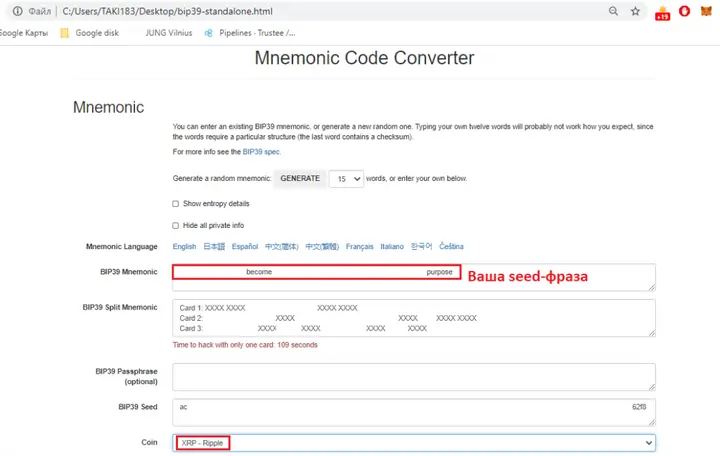
- Find the required address and its corresponding private key. In the Derived Addresses section, use the page search function — Ctrl+F on Windows and Linux or Command+F on macOS — and find your public XRP address. Its corresponding private key will be displayed alongside it. In Trustee Wallet, the required address may match the first address in the list, but you should never rely on the order alone: always compare the complete public address character by character. If a different HD account or a non-standard derivation path was used, the required address may appear further down the list or may not be displayed with the current settings.
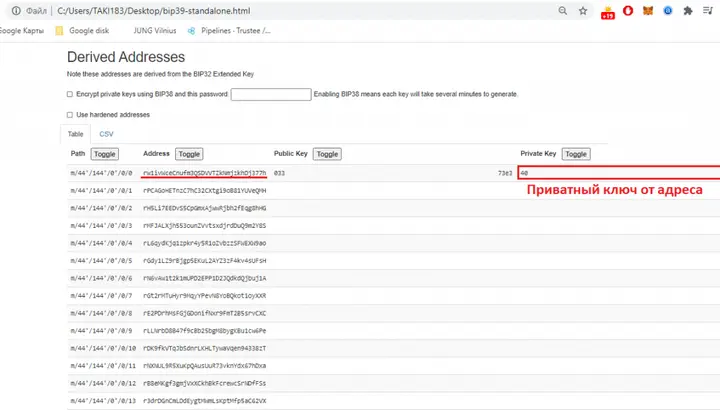
- Use the derived key only in a compatible XRP wallet. Not every XRP Ledger wallet supports the import of a raw private key. Some applications accept an XRPL secret or family seed, others accept a mnemonic phrase, while others do not allow secret values to be imported at all. Before importing anything, make sure that the application supports the exact key format displayed by BIP39 Tool and that it was downloaded from an official source.
This method can be used to derive private keys from a seed phrase only for cryptocurrencies and networks supported by the tool and using a compatible deterministic key-generation scheme. It would be incorrect to claim that the method works for absolutely every cryptocurrency: some networks use different mnemonic formats, signature algorithms, account structures or derivation methods.
It is also extremely important to follow good “digital hygiene” practices. The rules for handling a private key are comparable to the rules for storing a seed phrase: never share it with anyone, send it through messaging services or email, or save it in cloud storage, notes, screenshots or clipboard managers. Store the key in a secure offline environment and do not import it into unverified applications.
P.S. If you cannot see the required address or not all addresses are displayed, check the Derivation Path section — the cryptocurrency’s derivation path. This also applies to wallets such as Coinomi and Atomic Wallet, as different applications may use different paths, account numbers and address types. The general structure and purpose of derivation path levels are described in BIP44, while the current registry of cryptocurrency types is published in SLIP-0044. The exact derivation path should also be checked in the official documentation of the wallet from which the seed phrase was obtained.
FAQ
Can a private key be derived from any seed phrase?
Keys can be derived only when the mnemonic phrase, tool and derivation scheme are compatible with one another. BIP39 Tool supports many widely used networks, but not all cryptocurrencies and wallets use BIP39, BIP32 or standard derivation paths. Some networks require specialised official software.
Is it safe to enter a seed phrase into the online version of BIP39 Tool?
No. An active seed phrase should never be entered into the online version of the tool, even if the website appears to be official. The page, browser, connection or device may be controlled by malware. Use only the offline file from the official repository and run it on a clean computer with no network connections.
Why does the required address not appear under Derived Addresses?
The most common reasons are an incorrect derivation path, a different account number, a mismatched address type, the wrong network being selected or a missing additional BIP39 passphrase. A particular wallet may also use its own address-generation scheme. Compare the settings with the official documentation for the original wallet.
Can the private key I find be imported into any XRP wallet?
No. XRP Ledger wallets may support different import methods: a mnemonic phrase, family seed, secret or a private key in a particular format. Before importing it, check the documentation for the chosen application and make sure it supports the relevant format. Use official software only.
What should I do after deriving the private key?
Do not leave the seed phrase or private key on the computer you used. Securely destroy the temporary environment or reinstall the operating system before reconnecting the device to the internet. If the seed phrase was entered on a device that was not sufficiently trusted, create a new wallet on a secure device, store the new seed phrase offline and transfer the assets to the new addresses.