



























How to transfer funds to the Trustee Plus user
You can transfer digital assets to the Trustee Plus user as follows:
- In the main menu, choose “Transfer” and the currency to be sent;
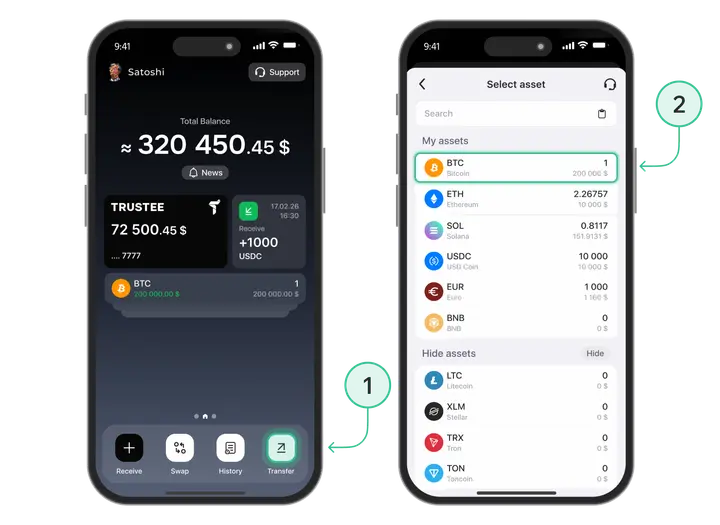
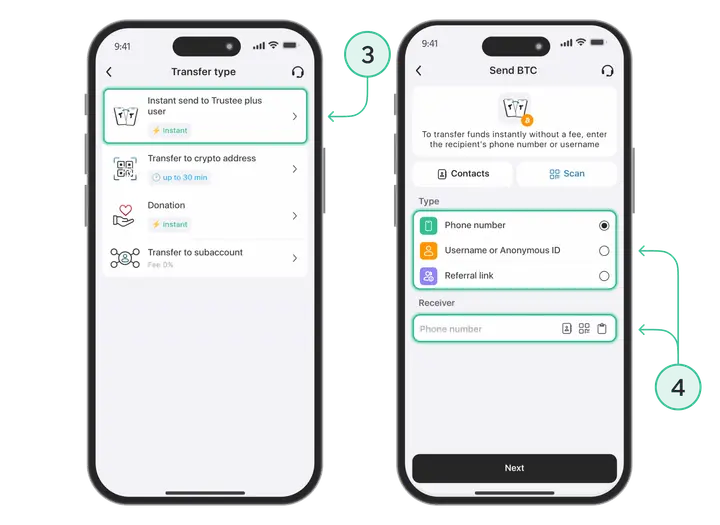
- Click on the “Instant transfer to the Trustee Plus user” button;
- Choose a phone number from the contact list or enter it manually. You can also specify the recipient’s profile ID or nickname in the Trustee system;
- Enter the amount, the asset balance will be displayed below the input field;
- Click on the “Transfer” button, to complete the transaction.
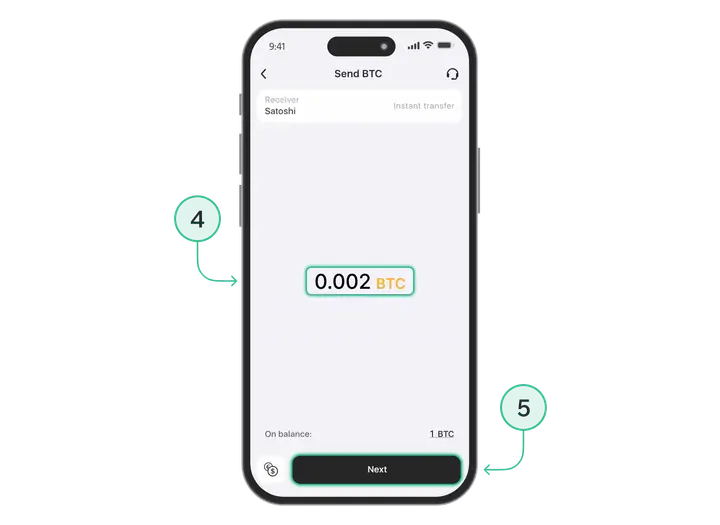
Asset transfer between the Trustee users is instant and with 0% commission.
Install Trustee Plus - a crypto wallet with payment card!
All the benefits in one app




This website uses cookiesIn order to ensure the functionality of the Website and to prepare a statistical analysis of the website visitors' navigation methods, we use cookies. Manage preferences