


For modern online businesses, SEO specialists, and developers, owning a strong domain name or a ready-made website is the foundation of success. Some domains sell for tens of thousands of dollars, and profitable online businesses can cost hundreds of thousands — or even millions.
This is especially relevant for:
- Web3 entrepreneurs;
- SEO specialists;
- investors in online businesses;
- crypto capital holders who do not want to convert it into fiat through banks.
In this guide, we will break down how to buy a domain with cryptocurrency, where to find the best SEO drops (expired domains), and how to buy an online business with Bitcoin using Trustee Plus.
Key takeaways
- Crypto as a payment method for internet assets.
Domain names, SEO drops, and ready-made websites can be paid for with cryptocurrency even on platforms that do not officially support crypto payments. This is done via a crypto wallet with a payment card that automatically converts assets during the transaction. - The domain and website market is a full-fledged digital economy.
Domain marketplaces, expired domain auctions, and online business exchanges form a separate market with high liquidity. Some domains sell for tens of thousands of dollars, and ready-made websites for hundreds of thousands. - Expired domains have special value for SEO.
Dropped domains often retain backlinks, traffic, and authority in search engines, which makes them popular among SEO specialists and affiliate marketers. - Ready-made websites are a way to buy a working online business.
Specialised marketplaces sell blogs, SaaS projects, eCommerce sites, and affiliate platforms. Investors buy them as ready-made income sources. - Trustee Plus makes it possible to pay for these purchases with crypto.
With the Trustee Plus crypto wallet and a virtual card, you can pay for domains, expired domains, or online businesses just like with a regular bank card.
Where to buy a domain or website with cryptocurrency: an overview of services
There are several categories of platforms where you can use digital assets.
1. Popular domain registrars
- GoDaddy: the largest marketplace in the world. It offers new domain registrations, premium domain purchases, and active auctions.
- Namecheap: known for its loyalty to the Web3 community. It is a great choice if you want to pay for a domain with cryptocurrency or use their internal marketplace.
- Dynadot: popular among SEO specialists thanks to a strong expired domains section and convenient filters.
2. Platforms for finding drops (Expired Domains)
- Expireddomains.net: a huge aggregator where you can find an expired domain and buy it with Bitcoin (by proceeding to the registrar).
- DropCatch: specialises in catching domains as they drop. Ideal for “hunting” domains with strong authority (DA/DR).
3. Ready-made business marketplaces
- Flippa: the best-known platform where you can buy a website with cryptocurrency. It lists everything from small blogs to large SaaS projects and eCommerce sites.
- Empire Flippers: for serious investments. Here you can buy an online business with Bitcoin with full revenue verification and deal support.
Current payment methods
Most platforms for buying domains or websites accept:
- bank cards;
- PayPal;
- bank transfers.
That is why users often rely on crypto wallets with payment cards, which allow them to pay with crypto through standard card infrastructure.
One such solution is Trustee Plus.
Benefits of Trustee Plus for domain deals:
- No barriers: you can pay with crypto where only Visa/Mastercard is accepted.
- Speed: you can buy an expired domain with Bitcoin instantly, without waiting for bank confirmations.
- Stability: payments are made via USDC, so the amount is pegged to the US dollar and does not depend on crypto market volatility.
What if you hold crypto and want to pay with it?
If your funds are stored in cryptocurrency, the simplest way to pay for domains or websites is to use a crypto wallet with a payment card.
Trustee Plus allows you to:
- store cryptocurrency;
- swap BTC, ETH, USDC, and other assets;
- pay for any services with a card.
The general flow looks like this:
- the user keeps USDC in the Trustee Plus wallet;
- the payment is made via a Trustee Plus virtual card;
- the transaction goes through as a standard card payment.
Step-by-step: how to buy a domain with crypto
The payment process is the same for most platforms. First, you need to register in Trustee Plus and issue a virtual card. A detailed instruction is available via the link.
Step 1. Download and register in Trustee Plus
- Download the Trustee Plus app from the App Store (iOS) or Google Play (Android).
- Enter your phone number.
- Enter the verification code you receive via SMS or email.
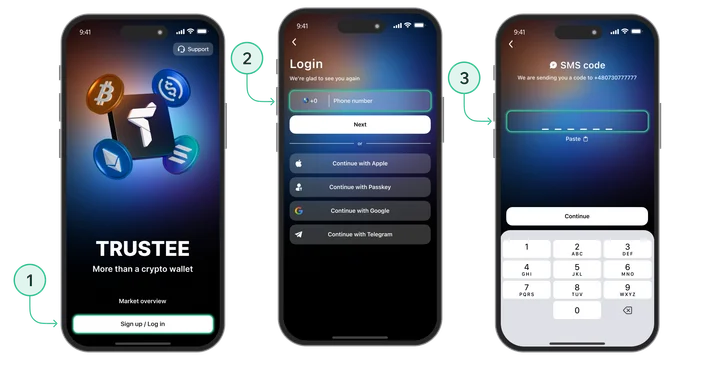
- Create a PIN code for secure access to the app.
Trustee Plus supports Bitcoin, Ethereum, USDC, and other assets, and lets you swap crypto quickly within the app.
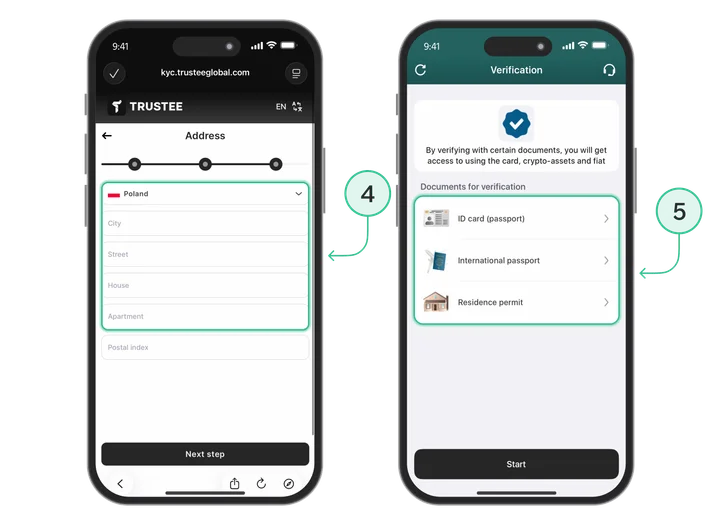
Step 2. Identity verification (KYC)
How to complete verification:
- In Trustee Plus, tap “Complete verification” (KYC).
- Select the document type: passport or ID card.
- Upload or take a photo of the document.
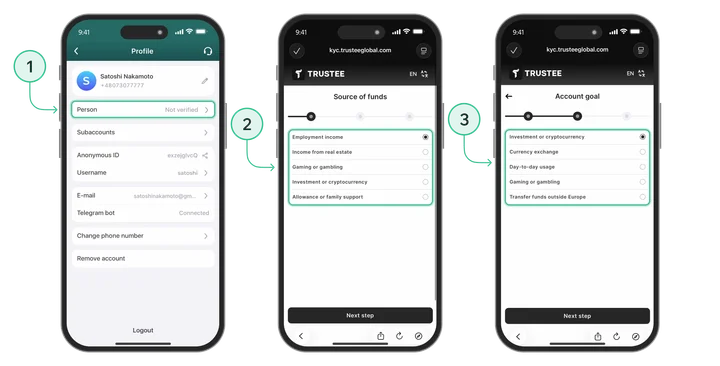
- Confirm your identity with a selfie.
- Submit the application for review.
Step 3. Top up your wallet with cryptocurrency
- Tap “Top up” in the main menu;
- Choose a cryptocurrency, for example USDC;
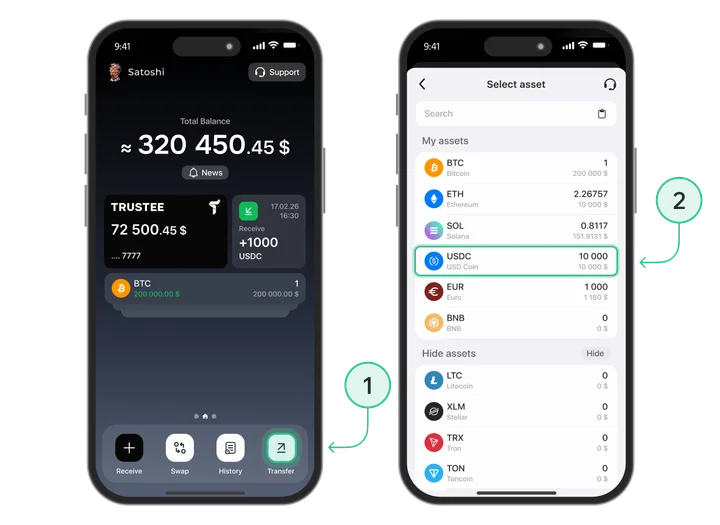
- Select the transfer type — “To a wallet address”;
- If needed, choose the network. For example, this is required when sending USDC;
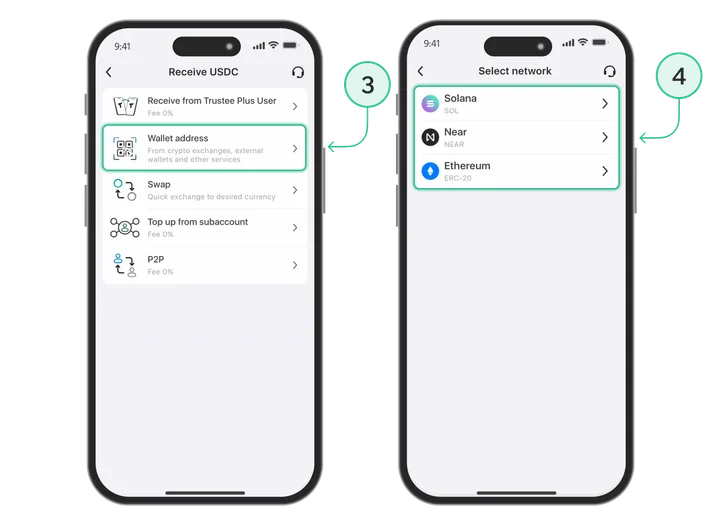
- A crypto address will appear: copy it or share it via QR code using the “Share” button.
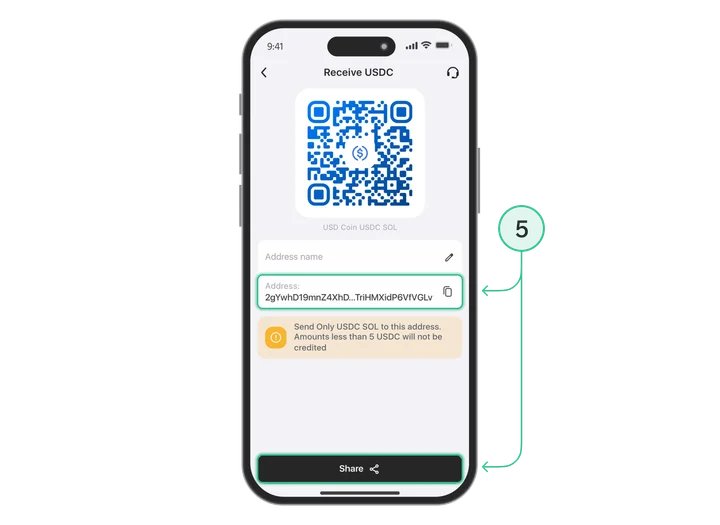
Step 4. Issue a payment card in Trustee Plus
How to issue a crypto card:
- Open the Trustee Plus app;
- On the main screen, go to the “Card” section;
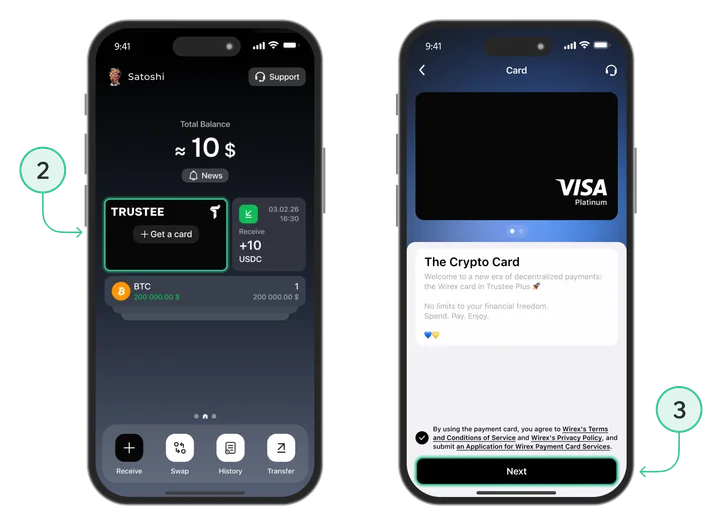
- Tap “Issue card”;
- Confirm the action;
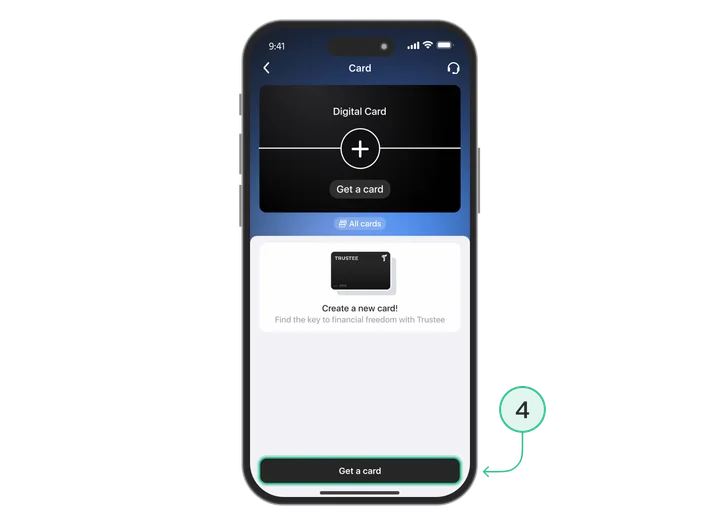
- Wait up to 59 seconds.
Next, go to the service where you want to buy the product and complete the payment.
Example 1: buying a domain on GoDaddy
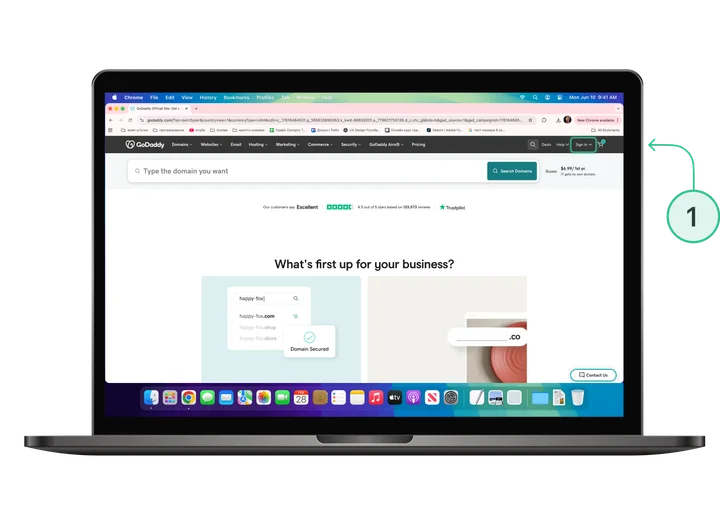
- Sign in to GoDaddy.
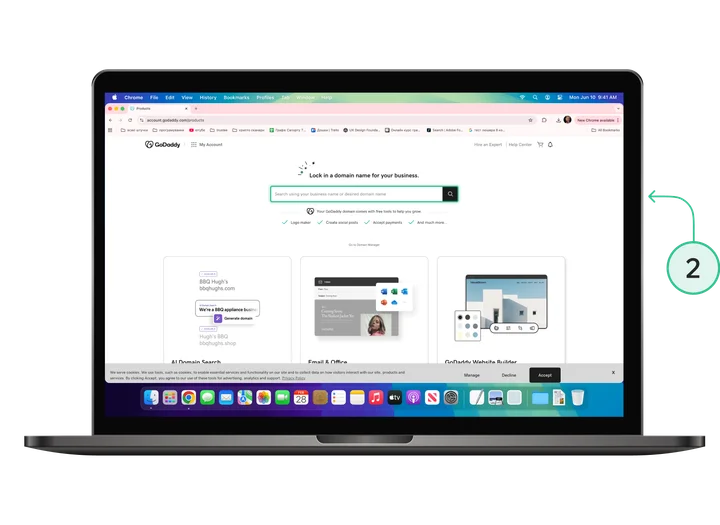
- Find the domain you need using search.
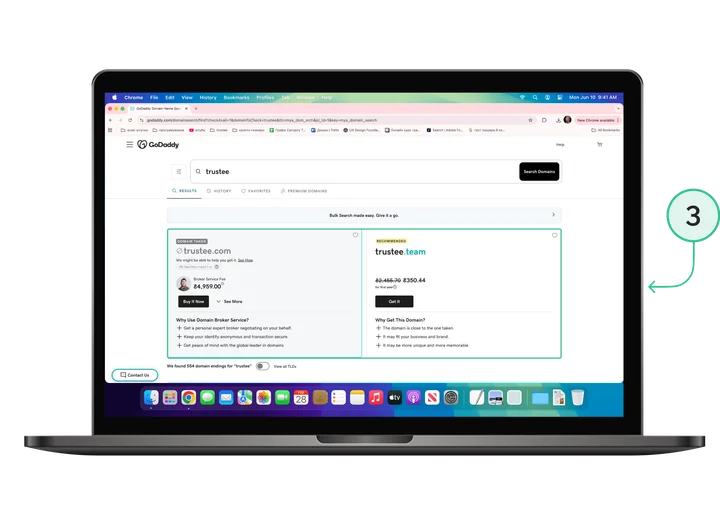
- Add it to your basket.
- Go to the checkout page.
- Select payment by bank card.
- Enter your card details from Trustee Plus.
- Confirm the payment.
Example 2: buying a website on Flippa
- Register on Flippa.
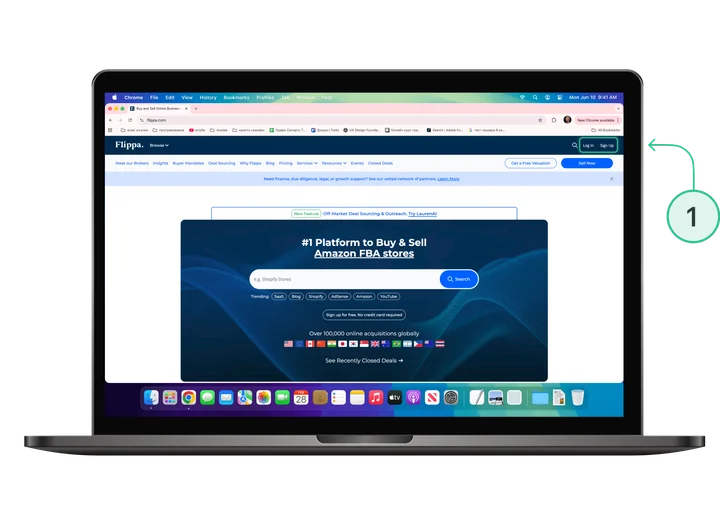
- Find the website or online business you want.
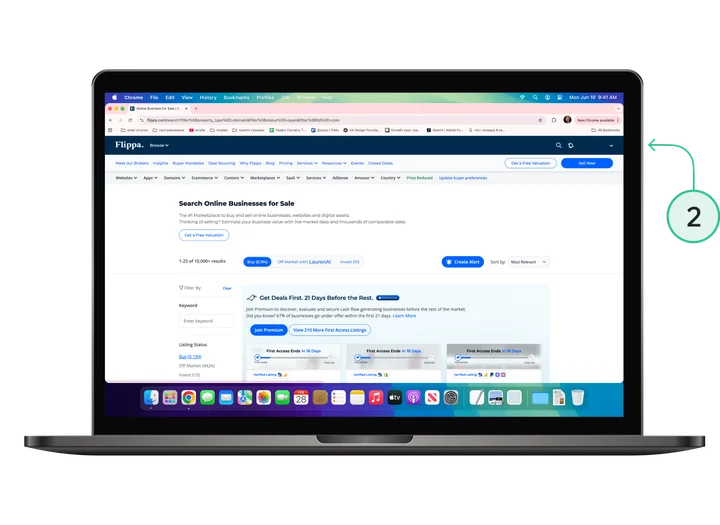
- Win the auction or click Buy Now.
- Proceed to checkout.
- Select card payment.
- Enter your card details from Trustee Plus.
- Confirm the transaction.
After the deal is completed, the asset is transferred via an escrow process.
Conclusion
The question of how to buy an expired domain with cryptocurrency or purchase a ready-made online business is now very easy to solve. With Trustee Plus, you can use your crypto capital on any global marketplace, gaining advantages in speed and financial independence. This makes investing in domains and websites more accessible for every user.
FAQ
Can you buy a domain with Bitcoin directly?
Some registrars (for example, Namecheap) accept BitPay, but this often comes with delays. Using a Trustee Plus card is a faster way to pay for a domain with cryptocurrency.
Is the card suitable for Flippa auctions?
Yes, you can buy a website with cryptocurrency on Flippa by linking your card in Trustee Plus to your profile.
Which crypto is best for payment?
We recommend using USDC to calculate the exact amount in US dollars and avoid depending on BTC price swings during checkout.
Can you pay for a domain with any cryptocurrency?
At the moment, payment is made via USDC. This helps avoid crypto market volatility and calculate the payment amount in US dollars accurately when buying a domain or website.