


The crypto card in Trustee Plus is a tool for those who want to use virtual assets in everyday life as easily as a regular bank card. Online and offline payments, Apple Pay and Google Pay, a separate balance and transparent terms.
It was created for people who live actively: paying for coffee, booking hotels, shopping online and travelling. It combines the convenience of traditional cards with the advantages of cryptocurrency, allowing users to legally store assets, exchange them quickly and pay without unnecessary steps.
We have gone through every stage of early launches, taken thousands of pieces of feedback into account and brought the product to perfection. Today, it is a fully mature, fast and secure service that proves its effectiveness in real life every day.
To clearly show why this product has become so popular, we have put together the TOP-7 key features of the Trustee Plus crypto card.
Feature 1. A Separate Balance for the Trustee Plus Crypto Card
The first thing to understand is this: the Trustee Plus crypto card works on the principle of a separate balance. This means that it is not directly linked to your main crypto account and does not “see” all your assets. You decide yourself how much to allocate specifically for card payments.
How does it work?
You have your main balance in Trustee Plus, for example Bitcoin, Ethereum or Solana. Separately from it, there is the card balance in USDC. You decide how much money to transfer to it for spending.
Why is this needed?
Expense control — the card works as a separate “budget”, so you can clearly see how much you have allocated for daily purchases.
Convenience — there is no need to convert crypto every time before each purchase.
TIP: use the card balance as your personal budget for the day or week. This makes expense control easier and makes using the card as predictable as possible.
Feature 2. 0% Fees on Payments with the Trustee Plus Card

Trustee Plus works according to a transparent model: 0% fees on all purchases — online and offline, with no hidden conditions.
What does this mean?
You buy a coffee for 3 dollars — exactly 3 dollars is debited from the card. Not 3.15 as a “conversion fee”, not 3.09 as a “service charge”, but exactly the amount the product costs. That is all. No surprises on your statement.
That is why the Trustee Plus card is ideal for everyday use:
-
- regular payments
- online purchases
- travel and spending abroad
Feature 3. Instant Trustee Plus Card Issuing (Up to 59 Seconds)
The Trustee Plus card is designed so that you can issue it and start using it immediately, without unnecessary steps or waiting. The whole process takes up to 59 seconds.
What do you need to issue it?
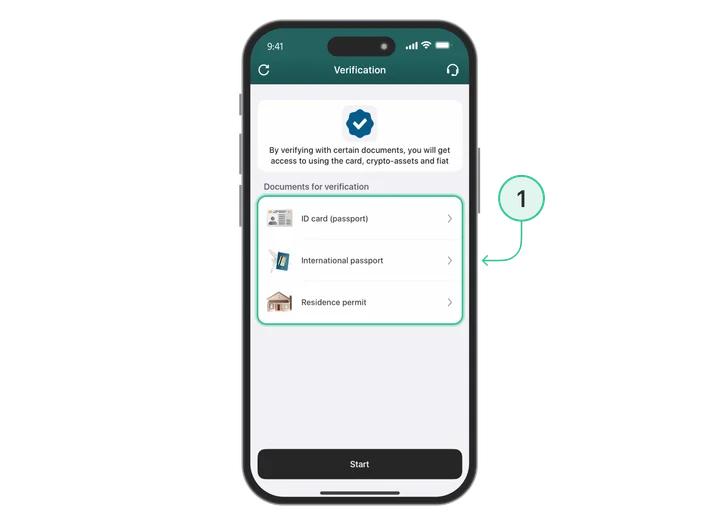
- complete verification (KYC) in your Trustee Plus account
- tap “Issue card”
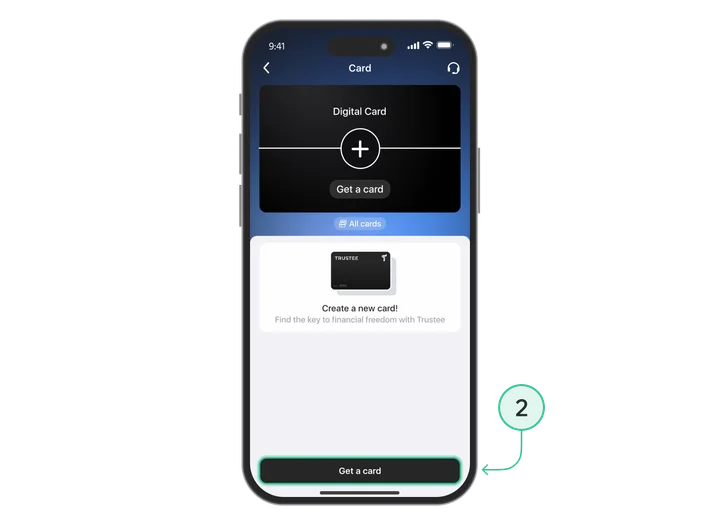
- wait up to 59 seconds
That is it! The card is ready to use.
Immediately after issuing, all card details are available to you:
-
- card number
- expiry date
- CVV code
This means you can use the card straight away, without pauses or additional confirmations.
With Trustee Plus, you can:
-
- pay for online purchases
- add the card to Apple Pay or Google Pay
- pay in offline shops via NFC
No waiting — simply issue the card and use it whenever it is convenient.
If you have not yet completed verification, do it in advance. KYC takes a few minutes, and then you can issue the card at any moment when you need it.
Feature 4. Apple Pay and Google Pay
A virtual card is great, but searching in the app, opening the interface… that is a lot of extra movement. In a queue at a supermarket or coffee shop, this is especially noticeable.
When the Trustee Plus card has been added to Apple Pay or Google Pay, payment comes down to a single gesture: bring your smartphone or smartwatch close to the terminal and confirm with Face ID / Touch ID.
How to add the card to your wallet
For Apple Pay:
- Go to the “More” section.
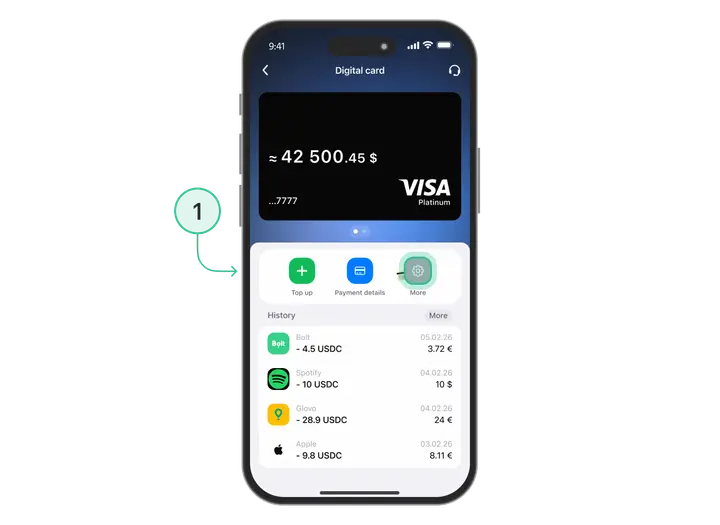
- Then open the Apple Pay section.
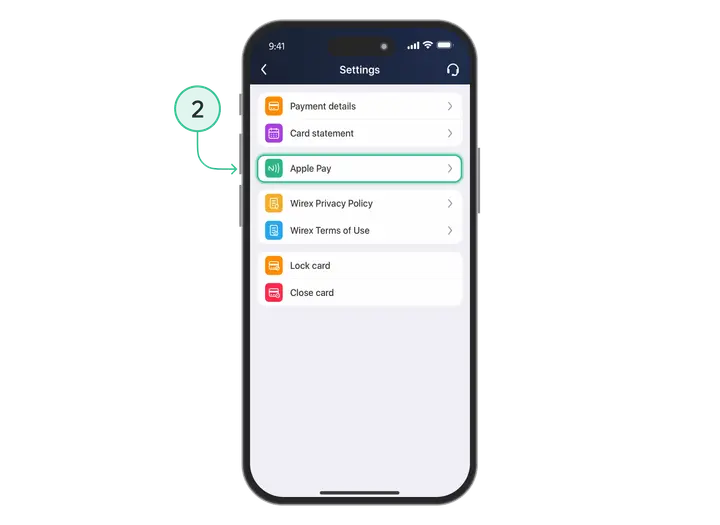
- Select the option to add the card to Apple Pay.
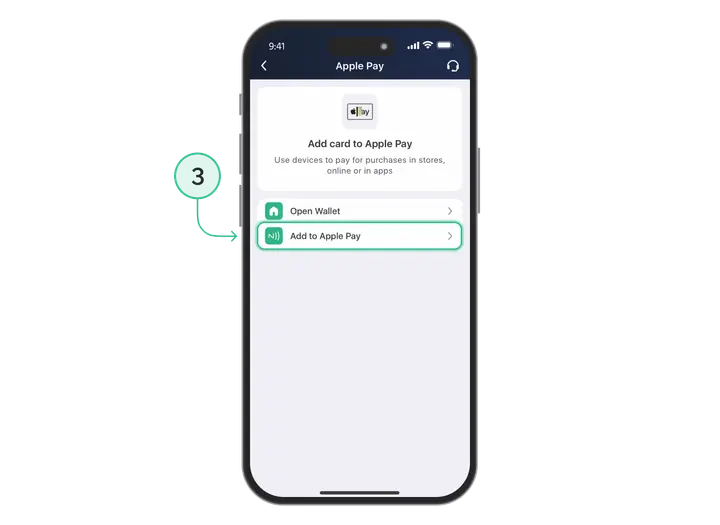
- After that, tap to open Wallet
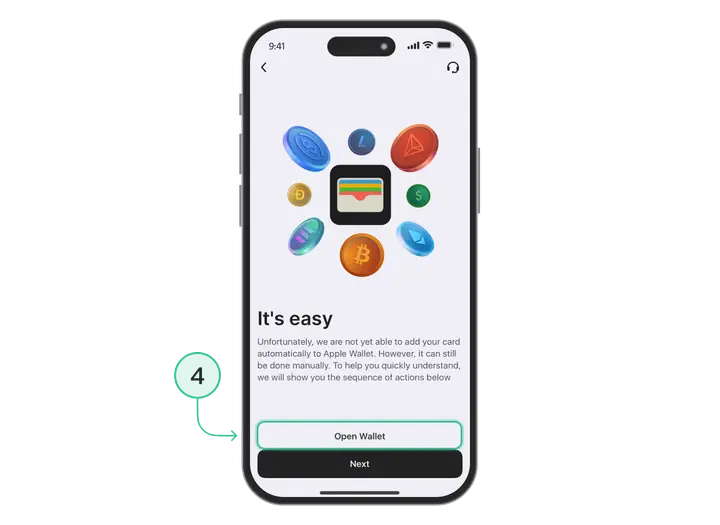
- Choose the option to add the card manually.
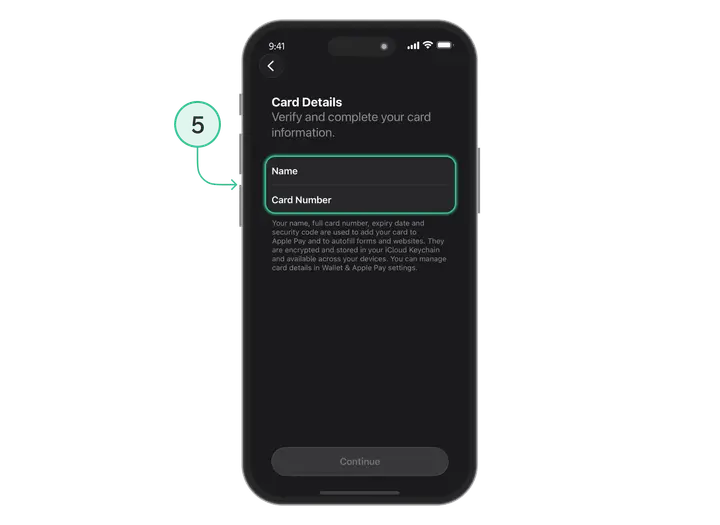
- Enter the card details and tap “Continue”.
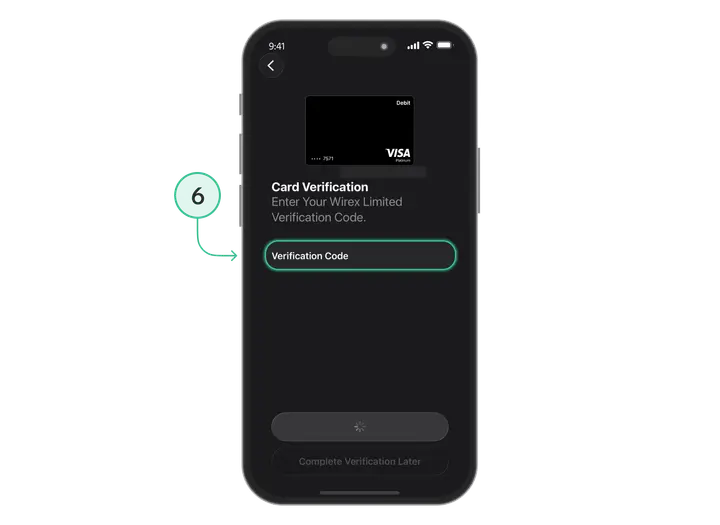
- Enter the code you receive to confirm adding the card.
For Google Pay:
- Open the Google Pay app.
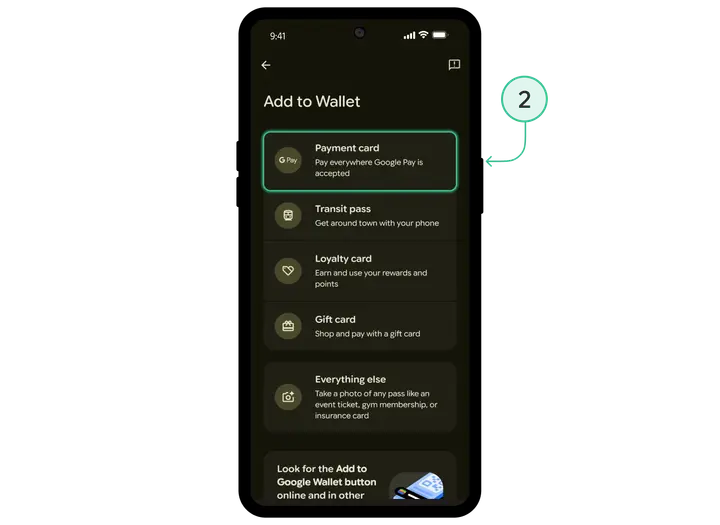
- Choose the option to add a “Payment card” to your wallet.
- Read and agree to the card issuer’s terms.
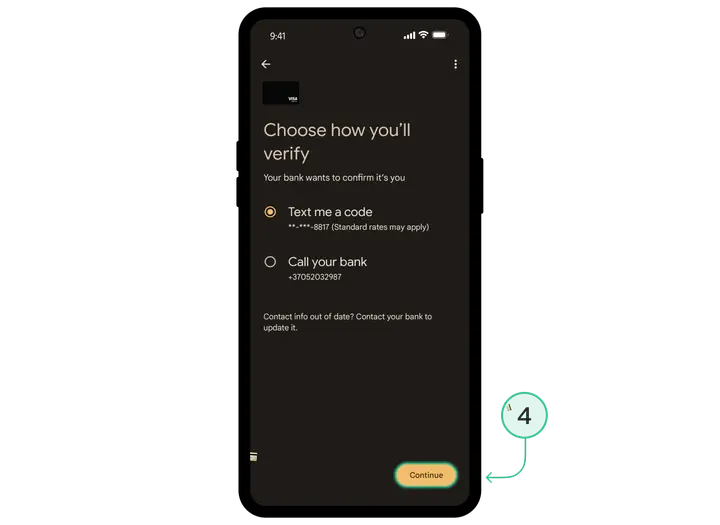
- Choose the verification method.
Only one final step remains — top up your Trustee Plus card balance and pay anywhere using NFC!
Advantages:
-
- Fast — no need to take out a physical card
- Secure — the card number is not shared with the merchant
- Convenient — your phone is always close at hand
Feature 5. USDC Top-Ups “Without Surprises”
The process of topping up the Trustee Plus card is as simple and transparent as possible.
How to top up the card
- Open the Trustee Plus app
- On the main screen, tap the “card” image
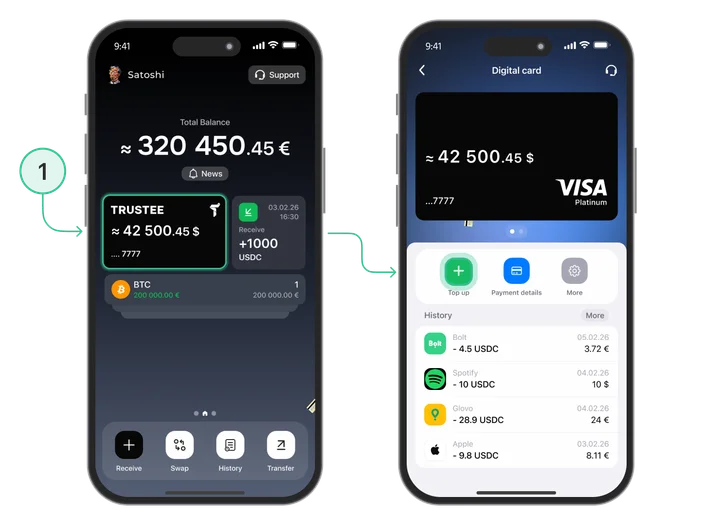
- Select the “Top up” button
- Enter the required amount in USDC
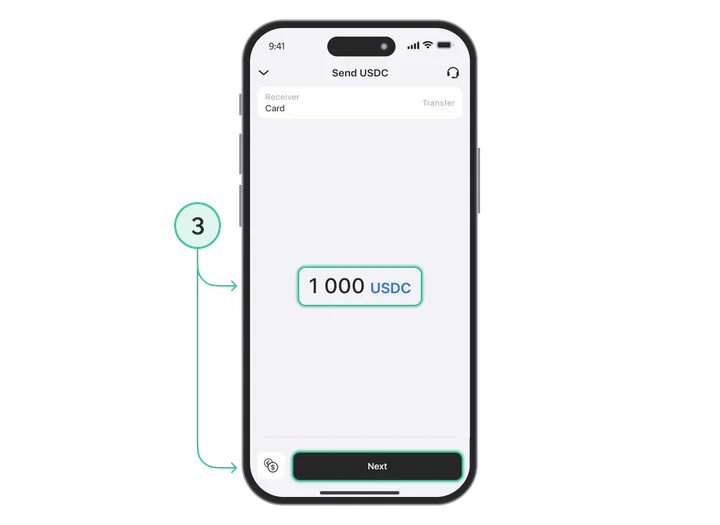
- Confirm the top-up
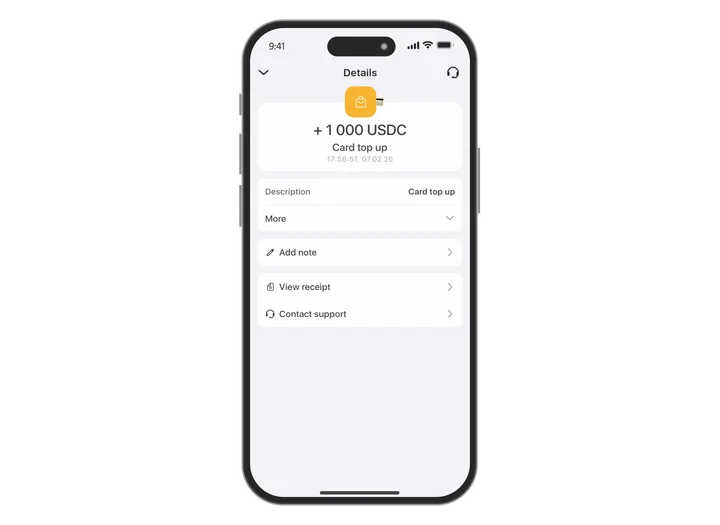
- Wait up to one minute
- Done — you can go and pay
Top-up limits:
- One-time: up to 3,000 USDC
- Maximum amount on the card: 5,000 USDC
Why USDC specifically?
USDC is a regulated stablecoin with a transparent reserve model, issued by the American company Circle and pegged to the US dollar (1 USDC = 1 USD). It has a transparent reserve model, so your balance does not depend on fluctuations in Bitcoin or Ethereum rates.
What comes next:
In the near future, we will add the ability to top up the card with any cryptocurrency — the system will automatically convert it into USDC. We will explain this in more detail below.
Feature 6. An Honest Model with No Hidden Terms

At Trustee Plus, we believe that finance should not be complicated or confusing. That is why our card is designed so that everything is clear from the start — with no small print and no unpleasant surprises.
What you get with the Trustee Plus card
-
- 0% fees for purchases — online or offline.
Pay for coffee, tickets or a restaurant — exactly the amount shown on the receipt is debited.
-
-
No service fee
-
No monthly charges, nothing extra.
-
-
No inactivity fees
-
Whether you use the card or not — there are no surprises.
-
-
Transparent conversion
-
USDC → EUR conversion at the market rate, with no additional mark-ups.
-
-
No hidden conditions
-
No small print or unexpected payments.
This is a card that lets you focus on what matters: your purchases, travels and plans, not numerous fees. Convenient, honest and transparent — that is exactly how we see a modern crypto card in Trustee Plus.
Feature 7. A Living Product That Develops Together with You
Trustee Plus is not a static financial app, but a product that is constantly improving. We have already passed the launch and testing stages, but have kept the main principle — listening to users. Every update is based on real requests and everyday experience.
That is why the product does not stand still, but constantly evolves together with users’ needs and the market.
What Will Appear in Trustee Plus in the Near Future

We never stop at what has already been achieved, and what was once only in plans or development is now part of our everyday service. Many of these features appeared precisely because you asked for them.
Topping Up the Card with Any Crypto
Now: USDC, USDT
Soon: Bitcoin, Ethereum, SOL, BNB and others
The system will automatically convert your crypto into USDC for payments. Holding Bitcoin? No problem — transfer BTC to the card, it will be converted into USDC, and you can pay.
PIN Code and Cash Withdrawals from ATMs
One of the most frequent requests is: “When will it be possible to withdraw cash?”
We are actively working on this. Cash withdrawals from ATMs require additional integration with processing centres, but this is a priority.
What will be available:
-
- PIN code for the card
- cash withdrawals from ATMs worldwide
- withdrawal limits (details will be specified later)
Higher Top-Up Limits
Now:
-
- Per transaction: 3,000 USDC
- Maximum amount on the card: 5,000 USDC
Planned:
-
-
Gradual increase of limits
-
Physical Cards
The current virtual card is fully functional for online and offline payments via Apple/Google Pay, but many people prefer physical plastic. We hear this.
Now:
Planned:
-
- Physical Trustee Plus card
- Expanded list of functionalities
Frequently Asked Questions
Is it safe to keep funds on the card balance?
Yes, it is absolutely safe. The card balance in Trustee Plus is separate from the main account. You control how much money you transfer to it.
This allows you to:
- manage expenses conveniently
- limit risk if the card is compromised
- use the card every day without worrying about the safety of your main savings
Will there be a physical card?
Yes, a physical card is planned and is already in development.
The virtual version is currently available and fully works for:
-
- online purchases
- offline payments (via Apple Pay/Google Pay)
We will announce the launch of physical cards separately in the app and through the official Trustee Plus channels.
What should I do if a payment has not gone through?
If a payment has not gone through, check:
-
Are there enough funds on the card balance?
Even if there is money in the main account, the card has a separate balance. Top it up.
-
Have the limits been exceeded?
Maximum amount on the card: 5,000 USDC. Maximum per top-up: 3,000 USDC.
-
Try again
Sometimes a payment may fail due to technical issues on the merchant’s side or with the acquiring bank.
-
Use another payment method
If it is urgent, pay with another card and find out the reason later.
-
If the situation repeats
Contact Trustee Plus support in the app. We will help you figure it out.
Where should I write if I have questions?
For all questions, contact Trustee Plus support:
-
- via chat in the app (the fastest way)
- through official support channels
The support team will help with:
-
- issuing and topping up the card
- checking payment statuses
- technical questions
- any nuances of use
We value our users and understand that when it comes to money, speed is extremely important. Support in the app usually replies within a few minutes.
No hidden fees. No long waiting. No unnecessary steps.
Simply top up, add it to Apple/Google Pay — and pay anywhere.
Ready to try?
Issue the card now and become part of the future today!