


Cryptocurrency stopped being something “for the chosen few” a long time ago. Today you can store, exchange and spend it just as easily as money on a regular bank card — thanks to the crypto card in Trustee Plus.
Trustee Plus is an app that combines a crypto wallet and a payment card, allowing you to pay for purchases online and in-store directly from your crypto balance. No complicated conversions, no extra steps, no hidden fees.
In this article, we’ll cover the entire user journey: from installing the app to your first purchase with the crypto card. Step by step, clearly, and without complex terms.
What is Trustee Plus and who is it for
Trustee Plus is a crypto wallet with a built-in virtual Visa card that lets you:
-
- Store cryptocurrency
- Quickly exchange crypto assets
- Pay for purchases online and in-store
- Use Apple Pay and Google Pay
- Control funds directly from your smartphone
This solution is ideal for:
-
- Those who receive income in cryptocurrency
- Freelancers and entrepreneurs working with international clients
- Expats, including Ukrainians abroad, who due to relocation or a change of residence have limited access to local banking products
- Anyone who wants to spend cryptocurrency easily in real life
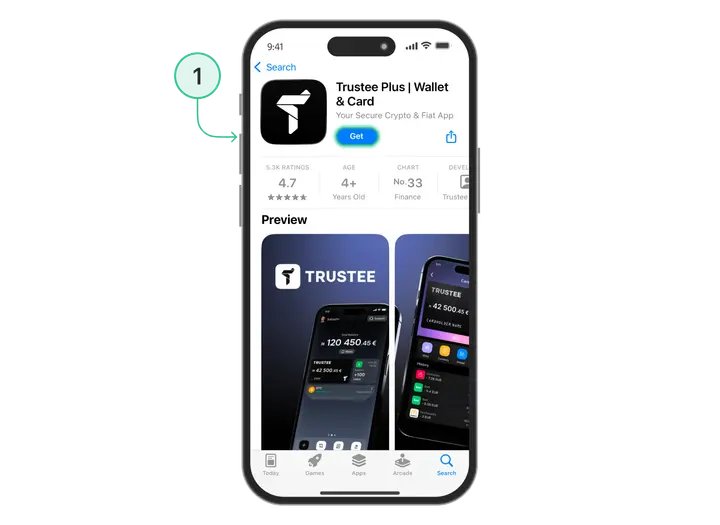
Step 1. Register in Trustee Plus
Let’s start with the simplest thing — creating an account.
How to register:
- Download the Trustee Plus app from the App Store (iOS) or Google Play (Android).
- Enter your phone number or email address.
- Enter the confirmation code you receive by SMS or email.
- Create a PIN for secure access to the app.
Done! At this stage you already have a full crypto wallet. You can receive, store and send cryptocurrency.
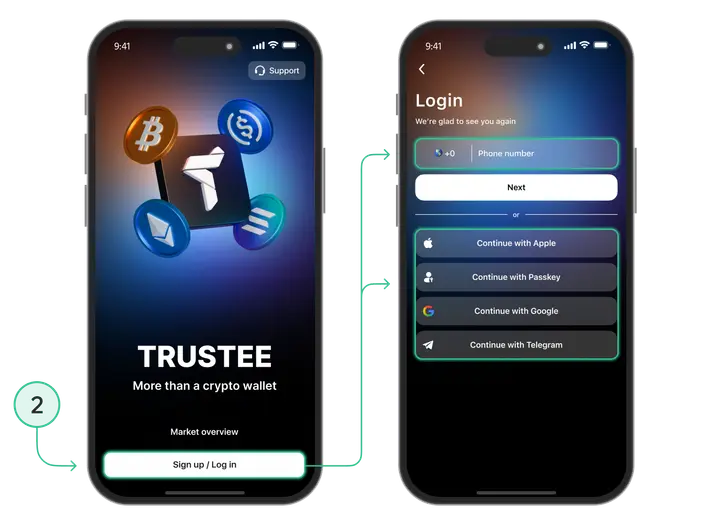
Step 2. Identity verification (KYC) — quick and hassle-free
To issue a crypto card and use Trustee Plus payment features, you need to complete identity verification (KYC — Know Your Customer). This is a standard requirement for financial services in Europe that ensures the safety and legality of crypto transactions.
What you need for verification:
-
- An identity document (passport or ID card)
- A few minutes of free time to confirm your identity in the app
How to complete verification:
- In the Trustee Plus app, tap “Complete verification” (KYC).
- Choose the document type: passport or ID card.
- Upload or take a photo of the document.
- Confirm your identity with a selfie.
- Submit the application for review.
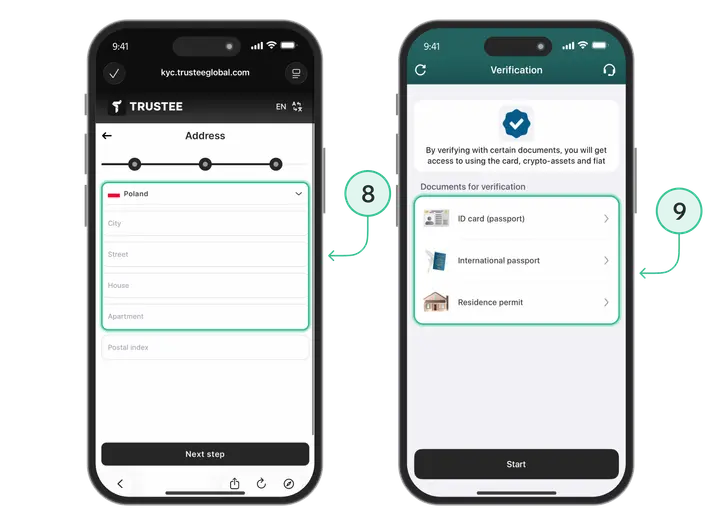
Step 3. How to top up your crypto wallet
If you have already completed verification (KYC), you can top up your crypto wallet right away. It’s quick and easy.
In Trustee Plus, there are several ways to top up your balance with cryptocurrency:
Option 1
Receive funds from another crypto address, service or exchange.
To do this:
- Tap the “Top up” button in the main menu of the service;
- Choose a cryptocurrency, for example USDC;
- Select the transfer type — “Top up to address”;
- If necessary, choose the network (for example, when transferring USDC);
- A crypto address will appear: copy it or send it via QR code using the “Share” button.
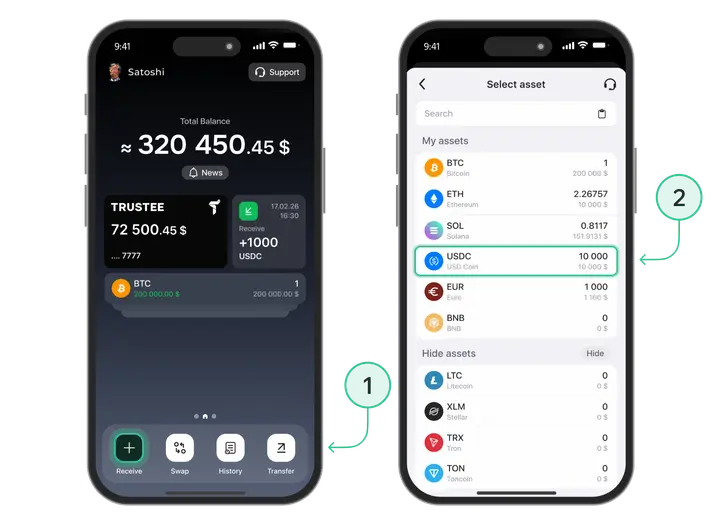
Option 2
Receive funds from another Trustee Plus user.
To do this:
- Send them your profile ID or phone number;
- On the main screen, tap “Profile” in the top-left corner;
- Tap “Profile” again — the field with your login and phone number;
- Tap “Anonymous ID” and choose the sending method.
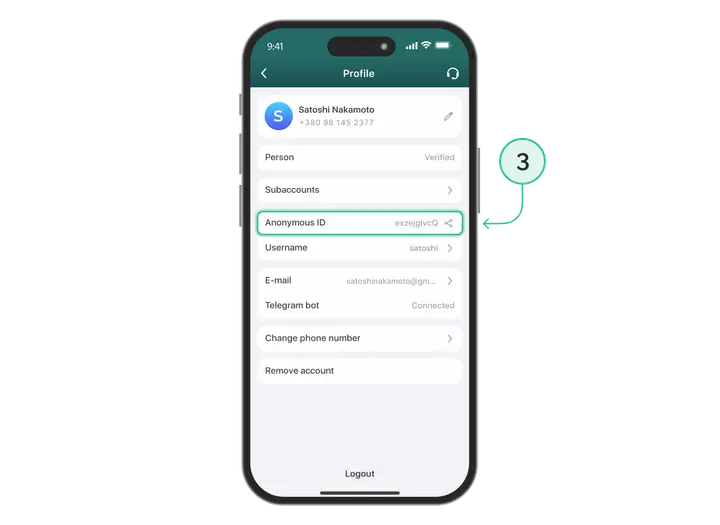
Funds will arrive quickly in your wallet and will be ready for further actions in the app.
Step 4. Issue the Trustee Plus crypto card
After successful verification, you can move on to the most interesting part — issuing the crypto card.
What’s important to know before issuing:
-
- The card is issued directly in the app (no need to wait for postal delivery)
- It’s a virtual Visa card, ready to pay immediately
- Issuance is almost instant (takes up to 59 seconds)
- You can add the card to Apple Pay or Google Pay
- The card has a separate balance that you top up yourself
How to apply for and issue a crypto card:
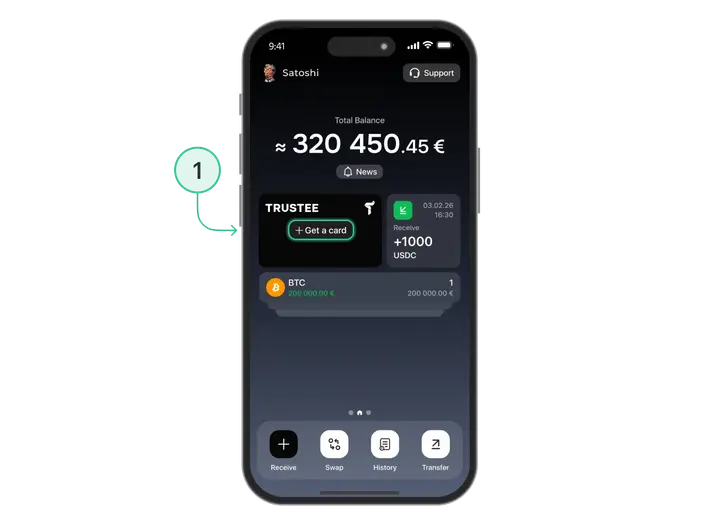
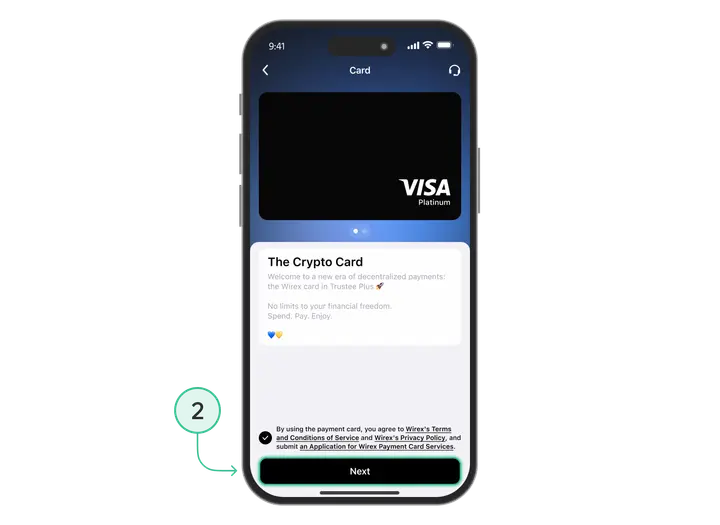
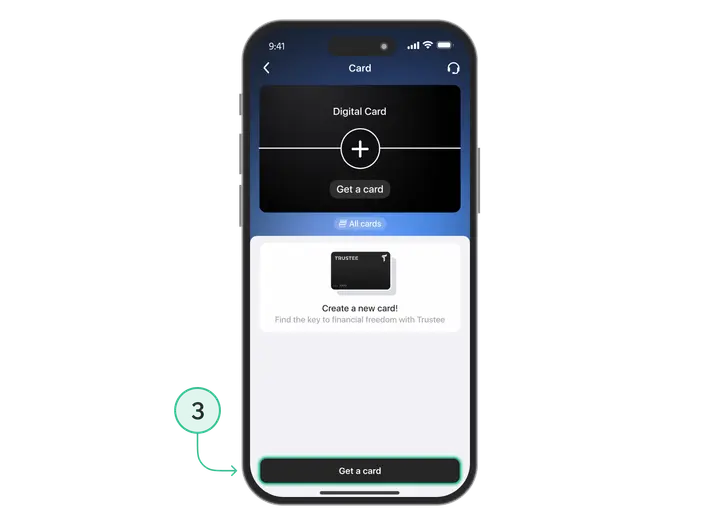
- Open the Trustee Plus app;
- On the main screen, go to the “Card” section;
- Tap “Issue card”;
- Confirm the action;
- Wait up to 59 seconds.
Done! The crypto card is active and ready to use.
What you see after issuance:
-
- Card number (16 digits)
- Expiry date (month/year)
- CVV (3 digits)
- Card balance (separate from your main crypto balance)
Now you can move on to topping up the card.
Step 5. Top up the crypto card with cryptocurrency
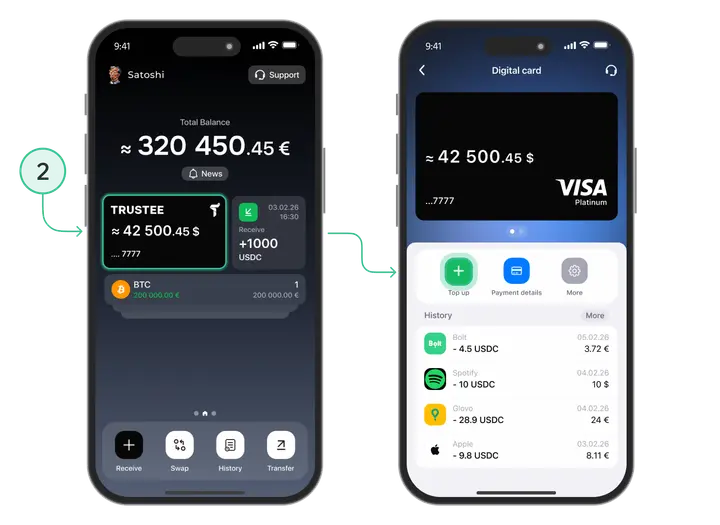
The Trustee Plus crypto card has a separate balance that you top up yourself from your main crypto balance in the app. This is convenient for spending control and security. You decide how much to allocate for card payments.
How to top up the card:
- In the “Card” section, tap “Top up”;
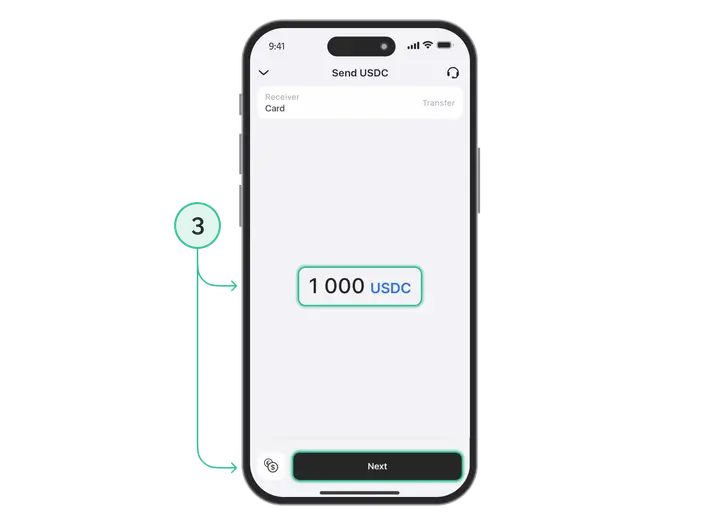
- Select the amount in USDC or USDT you want to transfer from your main balance to the card;
- Confirm the transaction;
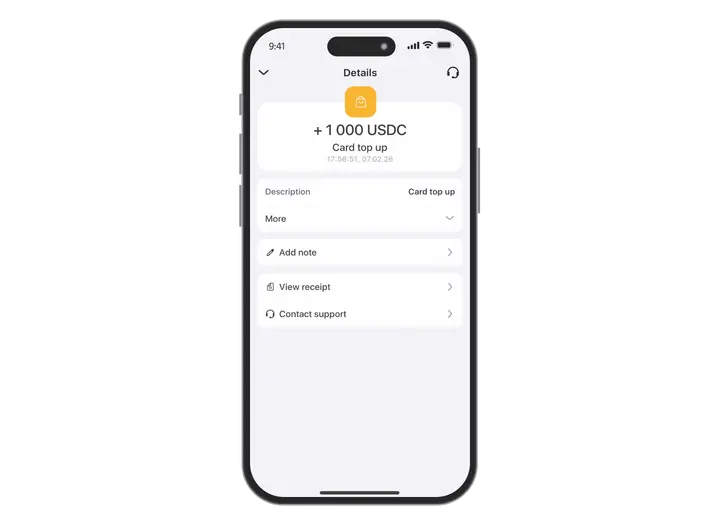
- Wait up to one minute — the funds will appear on the card balance.
Top-up limits:
-
- One-off: up to 3,000 USDC or USDT
- Maximum amount on the card: 5,000 USDC or USDT
What if your balance holds a different cryptocurrency, not USDC?
If your balance holds Bitcoin, Ethereum, Solana, first exchange them to USDC or USDT using the built-in exchange in Trustee Plus (with no fee). After that, top up the card.
P.S. Soon, Trustee Plus will add the ability to top up the card with any cryptocurrency — the system will automatically convert it into USDC or USDT.
Step 6. Add the card to Apple Pay or Google Pay
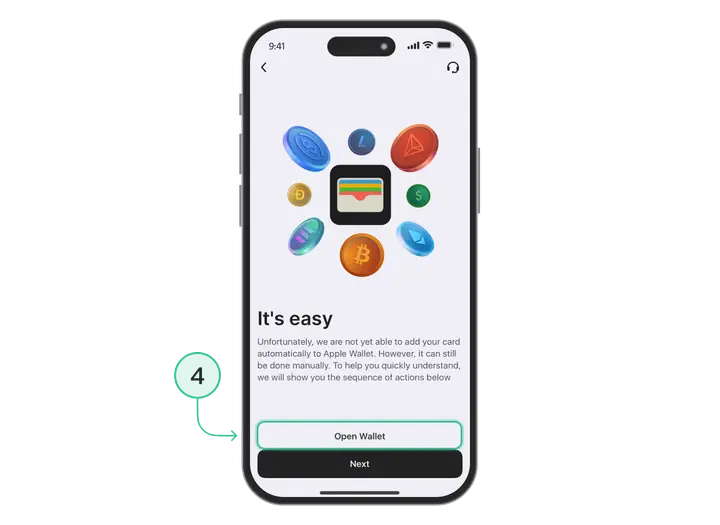
To pay in physical shops using your smartphone or smartwatch, add the Trustee Plus crypto card to Apple Pay or Google Pay.
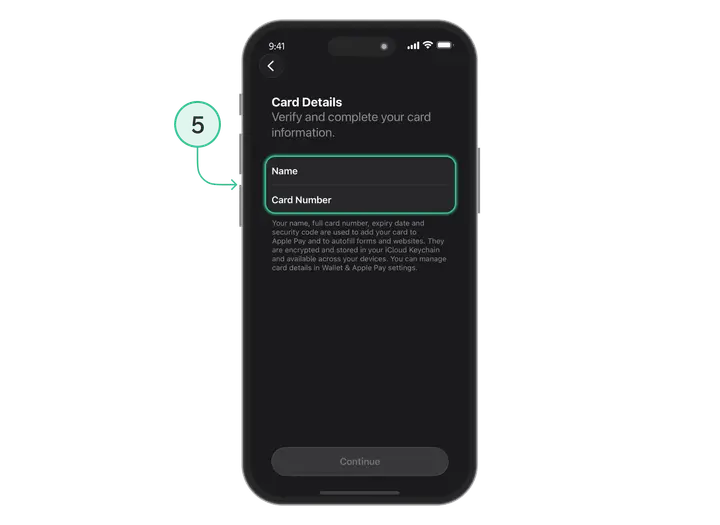
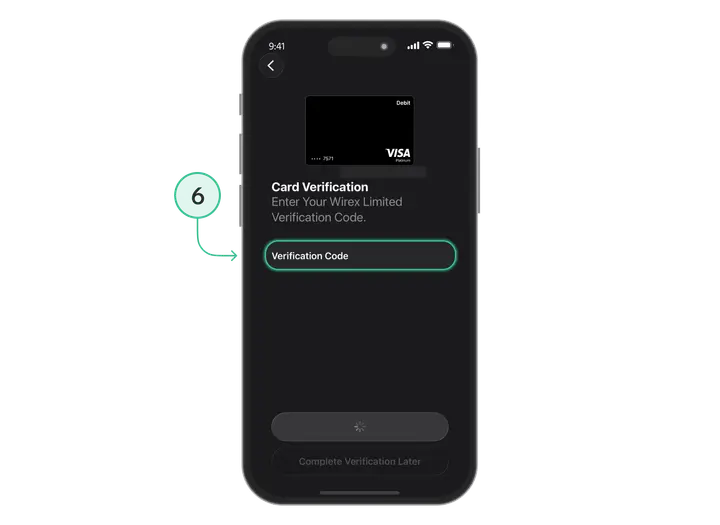
For Apple Pay:
- Open Wallet on your iPhone;
- Tap “+” (add a card);
- Enter the card details from Trustee Plus;
- Confirm via SMS or email;
- Done — you can pay with Apple Pay.
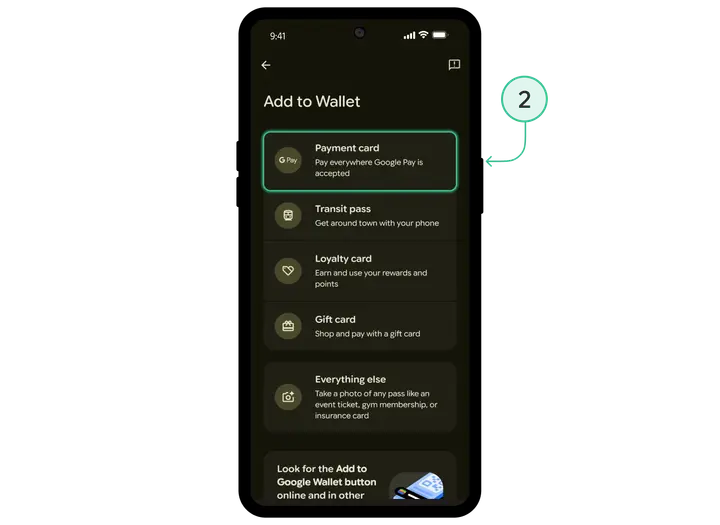
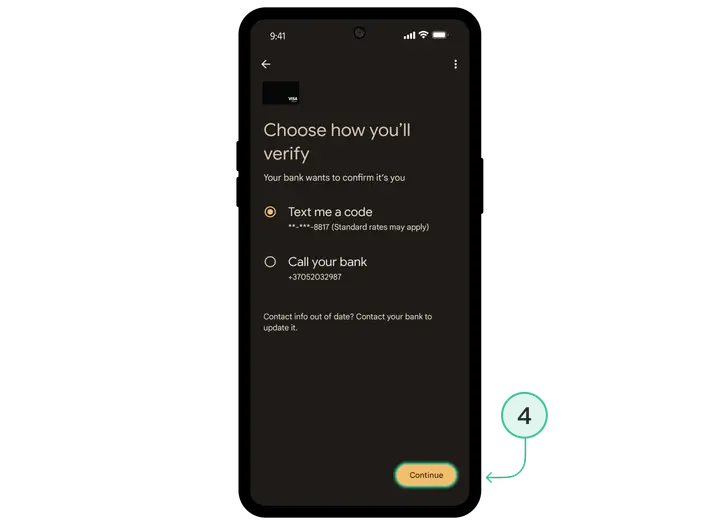
For Google Pay:
- Open Google Pay (or Google Wallet);
- Tap “Add a card”;
- Enter the card details;
- Confirm (a code from SMS may be required);
- Done — you can pay with Google Pay.
Benefits of using Apple Pay / Google Pay:
-
- Fast — no need to take out a physical card
- Secure — the card number is not shared with the merchant
- Convenient — your phone is always to hand
Your first payments with the Trustee Plus crypto card
And here is the moment it all started for — your first purchase with the Trustee Plus crypto card!
What you can pay for:
-
- Online shopping (any online marketplaces)
- Supermarkets and shops
- Cafés, restaurants, petrol stations
- Online services
- Hotels, tickets, car hire
- Online services
When the Trustee Plus card is added to Apple Pay or Google Pay, payment comes down to a single gesture: hold your phone or smartwatch to the terminal and confirm with Face ID / Touch ID. The payment goes through just like with a regular bank card.
Why should you get the Trustee Plus crypto card right now?
Minimum effort — maximum value
From registration to your first purchase — just a few minutes.
Quick start with no complicated setup
Everything is intuitive, even for beginners.
Real-world crypto spending every day
Pay with cryptocurrency anywhere regular bank cards are accepted.
Full control of your funds
You manage your crypto assets without intermediaries.
0 % purchase fees — online and in-store
Exactly the amount on the receipt is deducted — with no hidden charges.
Conclusion
Trustee Plus proves that using cryptocurrency in everyday life is simple. Issuing a crypto card takes minimal time, and the benefits are felt from the very first transaction.
Ready to try it?
Download Trustee Plus, complete verification, and issue a virtual crypto card right now. Become part of the future today!